



Skip to content
View in the app

A better way to browse. Learn more.

WRobot

A full-screen app on your home screen with push notifications, badges and more.

To install this app on iOS and iPadOS
  1. Tap the Share icon in Safari
  2. Scroll the menu and tap Add to Home Screen.
  3. Tap Add in the top-right corner.
To install this app on Android
  1. Tap the 3-dot menu (⋮) in the top-right corner of the browser.
  2. Tap Add to Home screen or Install app.
  3. Confirm by tapping Install.

Server connection...

  • Product: WRobot General
  • Type: Bug
  • Status: Unconfirmed

Hello, 

sometimes i can connect to the server, but when i try a bit later with a second client i cant connect:
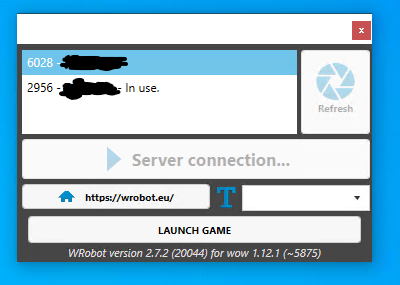
image.png.4767c891561b14acfba9743077ab1c8d.png

The only way to fix it currently is to restart and hope for the best. Running more than 1 client is not working.

User Feedback

Recommended Comments

nfx

Members

After some further testing it seems that sometimes after a few minutes trying (20 times restarting the wrobot.exe) it can establish a connection.

However it is super painful and it takes sometimes up to 20 minutes to get one bot running.

Create an account or sign in to comment

Account

Navigation

Search

Search

Configure browser push notifications

Chrome (Android)
  1. Tap the lock icon next to the address bar.
  2. Tap Permissions → Notifications.
  3. Adjust your preference.
Chrome (Desktop)
  1. Click the padlock icon in the address bar.
  2. Select Site settings.
  3. Find Notifications and adjust your preference.