



Skip to content
View in the app

A better way to browse. Learn more.

WRobot

A full-screen app on your home screen with push notifications, badges and more.

To install this app on iOS and iPadOS
  1. Tap the Share icon in Safari
  2. Scroll the menu and tap Add to Home Screen.
  3. Tap Add in the top-right corner.
To install this app on Android
  1. Tap the 3-dot menu (⋮) in the top-right corner of the browser.
  2. Tap Add to Home screen or Install app.
  3. Confirm by tapping Install.

Startup program error

  • Version: All
  • Product: WRobot General
  • Type: Bug
  • Status: Not a Bug

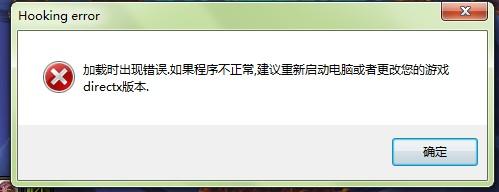
启动程序错误,提示(hooking error)内容(加载时出现错误,如果程序不正常,建议重启电脑或更换游戏的directx版本),我用的是window7旗舰操作系统,DirectX版本是11,请帮我解决这个问题,谢谢
wrobot.jpg

User Feedback

Recommended Comments

chenmo302

Members


8 hours ago, Droidz said:

Hello, try to launch bot with shortcut "WRobot (DX hook)"

I created WRobot (DX hook), but I still reported an error. I upgraded the graphics interface version to 12, but it still doesn't work!

chenmo302

Members

214528822_.png.fcf8cfe3cdb86447e24a30315a11e72d.png

快捷方式.png

WRobot for BFA poorly supports Windows 7, try with Windows 10.

chenmo302

Members
47 minutes ago, Droidz said:

WRobot for BFA poorly supports Windows 7, try with Windows 10.

Is there any other way besides replacing the system?

not for this game version sorry, you can use VM (if your computer is powerful enough)

chenmo302

Members
4 minutes ago, Droidz said:

not for this game version sorry, you can use VM (if your computer is powerful enough)

Thank you for your answer!

Create an account or sign in to comment

Account

Navigation

Search

Search

Configure browser push notifications

Chrome (Android)
  1. Tap the lock icon next to the address bar.
  2. Tap Permissions → Notifications.
  3. Adjust your preference.
Chrome (Desktop)
  1. Click the padlock icon in the address bar.
  2. Select Site settings.
  3. Find Notifications and adjust your preference.