




Skip to content
View in the app

A better way to browse. Learn more.

WRobot

A full-screen app on your home screen with push notifications, badges and more.

To install this app on iOS and iPadOS
  1. Tap the Share icon in Safari
  2. Scroll the menu and tap Add to Home Screen.
  3. Tap Add in the top-right corner.
To install this app on Android
  1. Tap the 3-dot menu (⋮) in the top-right corner of the browser.
  2. Tap Add to Home screen or Install app.
  3. Confirm by tapping Install.

Unable to start/connect game

  • Product: WRobot General
  • Type: Bug
  • Status: Not a Bug

When i start wow without wrobot - all works fine.

When i start wow from wrobot: "Launch Bot" > "Login - Last usage: ..." > "Please select game Process and coneect to the game. OK" > "Do you want lauch Wow in 32 bit mode? YES"

after that - nothing happend for like 2-3 mins and that error apprear, its in russian but its says:
"cannot connect to data source" or something like that: https://eu.battle.net/support/article/7411
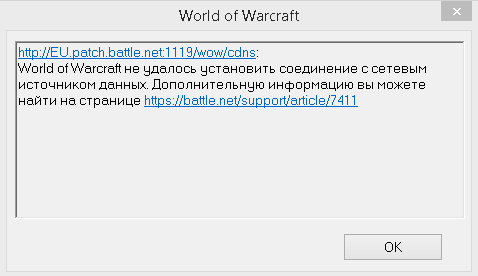
Wow_2016-03-29_23-38-03.png

User Feedback

Recommended Comments

camelot10

Elite user

close this bug, repaired install of wrobot and wow, problem solved.

Create an account or sign in to comment

Account

Navigation

Search

Search

Configure browser push notifications

Chrome (Android)
  1. Tap the lock icon next to the address bar.
  2. Tap Permissions → Notifications.
  3. Adjust your preference.
Chrome (Desktop)
  1. Click the padlock icon in the address bar.
  2. Select Site settings.
  3. Find Notifications and adjust your preference.