



Skip to content
View in the app

A better way to browse. Learn more.

WRobot

A full-screen app on your home screen with push notifications, badges and more.

To install this app on iOS and iPadOS
  1. Tap the Share icon in Safari
  2. Scroll the menu and tap Add to Home Screen.
  3. Tap Add in the top-right corner.
To install this app on Android
  1. Tap the 3-dot menu (⋮) in the top-right corner of the browser.
  2. Tap Add to Home screen or Install app.
  3. Confirm by tapping Install.

[Vanilla] DeeprunTram Map missing

  • Product: WRobot General
  • Type: Bug
  • Status: Unconfirmed

DeeprunTram map cannot be displayed on vanilla server, and there is an error message in the log.

[D] 20:11:35 - GetRequest(string url="https://pathfindervanilla.mmorobot.com/", string parameters="FindPath=eyJLIjoiMjM2MDQwMDc4MTcwIiwiQyI6IkF6ZXJvdGgiLCJTIjp7IlgiOi00ODM4LjgyMiwiWSI6LTEzMTcuNTk0MzYsIloiOjUwMS44Njh9LCJFIjp7IlgiOi00ODM4LjAxNiwiWSI6LTEzMTIuMzI4LCJaIjo1MDEuODY4fSwiVyI6MS41LCJCIjpmYWxzZSwiQSI6W10sIkYiOjIsIkciOjAsIkwiOmZhbHNlfQ==")#3: System.Threading.ThreadAbortException: 正在中止线程。
   在 System.Net.Connection.SyncRead(HttpWebRequest request, Boolean userRetrievedStream, Boolean probeRead)
   在 System.Net.ConnectStream.ProcessWriteCallDone(ConnectionReturnResult returnResult)
   在 System.Net.HttpWebRequest.CheckDeferredCallDone(ConnectStream stream)
   在 System.Net.HttpWebRequest.GetResponse()
   在 robotManager.Helpful.Others.PostRequest(String url, String parameters, Boolean showErrors, Int32 requestTimeoutMs)
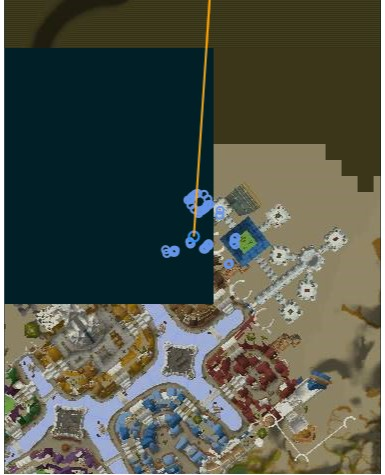
blob.png.5109a875f7492ae1f7d650e2f333d147.png


User Feedback

Recommended Comments

valetine

WRobot user
Just now, Droidz said:

Hello, you get this problem all the time?

Yeah,never showed the DeeprunTram Map.

Create an account or sign in to comment

Account

Navigation

Search

Search

Configure browser push notifications

Chrome (Android)
  1. Tap the lock icon next to the address bar.
  2. Tap Permissions → Notifications.
  3. Adjust your preference.
Chrome (Desktop)
  1. Click the padlock icon in the address bar.
  2. Select Site settings.
  3. Find Notifications and adjust your preference.