




Skip to content
View in the app

A better way to browse. Learn more.

WRobot

A full-screen app on your home screen with push notifications, badges and more.

To install this app on iOS and iPadOS
  1. Tap the Share icon in Safari
  2. Scroll the menu and tap Add to Home Screen.
  3. Tap Add in the top-right corner.
To install this app on Android
  1. Tap the 3-dot menu (⋮) in the top-right corner of the browser.
  2. Tap Add to Home screen or Install app.
  3. Confirm by tapping Install.

[Vanilla][Mesh] Thoradins wall

  • Version: All
  • Product: WRobot General
  • Type: Bug
  • Status: Fixed

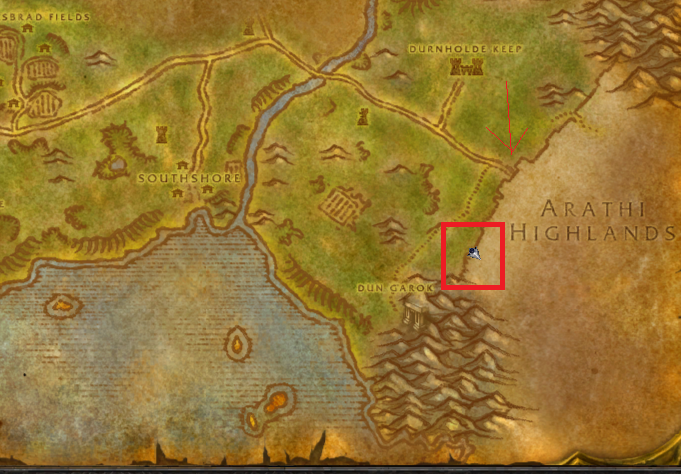
Mesh report- Thortadins wall.

The mesh between hillsbrad / Arathi highlands is non functional.  Bot will sit in a crack in the wall instead of walking though and get stuck for ever.


Attached Files:
User Feedback

Recommended Comments

eeny

Elite user

Was working well last week.  however this mesh issue has returned

Toradins 2.PNG

eeny

Elite user

21 Aug 2018 18H51.log.html

That's a bot running from Southshore Inn back into Arathi.  Dont know if your playing with the path server atm.  Just now  it runs to the small crack in the wall it cant run through, got stuck 2-3 times and made a new path through the big gap. 

thoradins2.PNG

Create an account or sign in to comment

Account

Navigation

Search

Search

Configure browser push notifications

Chrome (Android)
  1. Tap the lock icon next to the address bar.
  2. Tap Permissions → Notifications.
  3. Adjust your preference.
Chrome (Desktop)
  1. Click the padlock icon in the address bar.
  2. Select Site settings.
  3. Find Notifications and adjust your preference.