



Skip to content
View in the app

A better way to browse. Learn more.

WRobot

A full-screen app on your home screen with push notifications, badges and more.

To install this app on iOS and iPadOS
  1. Tap the Share icon in Safari
  2. Scroll the menu and tap Add to Home Screen.
  3. Tap Add in the top-right corner.
To install this app on Android
  1. Tap the 3-dot menu (⋮) in the top-right corner of the browser.
  2. Tap Add to Home screen or Install app.
  3. Confirm by tapping Install.

wrobot shutdown by itself

  • Product: WRobot General
  • Type: Bug
  • Status: Cannot Reproduce

hi , thanks for this awsome bot

i have a problem running my wrobot from 4days.

what happens is the bot shutdown by itself , it closes randomly , it can be after a min of running or many hour.

so just the bot program closes not wow game.

i havn't made any changes in the options , it just happened suddenly, it is up to date btw

i have screened this , plz help
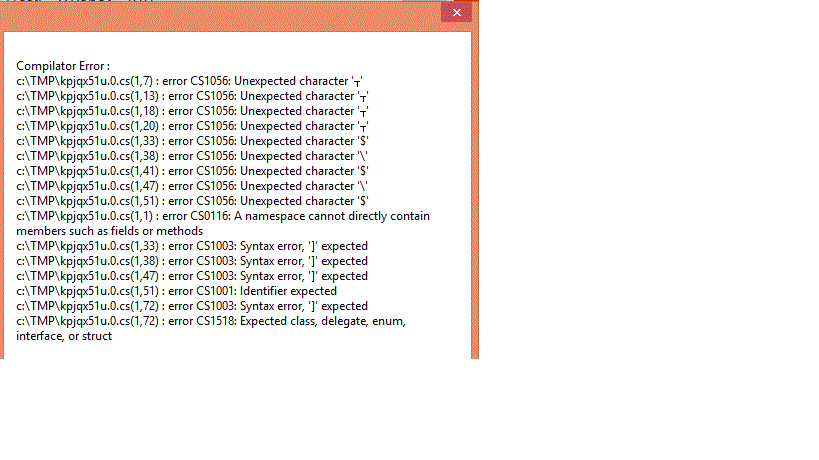
ccs-7105-0-57878300-1385126624_thumb.gif


Attached Files:

User Feedback

Recommended Comments

sirusalpha

Members

hi ,


for instance its been working very fine for at least 12 hour and now it closes


 this is the log


[D] 10:16:21 - Log file created: 25 Nov 2013 10H16.log.html
[D] 10:16:21 - WRobot Version: 1.1.1 for wow: 5.4.1_17538
[D] 10:16:21 - Offical website: http://wrobot.eu/
[D] 10:16:21 - Operating System Details: Microsoft Windows NT 6.2.9200.0
[D] 10:16:21 - Lang: English (United Kingdom)
[E] 10:16:21 - D3D9 ERROR

[F] 10:16:22 - D3D11 found: 8B FF 55 8B EC 83 E4 F8 83 EC
[D] 10:16:22 - D3D11 used
10:16:28 - Select game process: 5868 - Fro...
10:16:28 - Initialize Battlegrounder Complete
[D] 10:16:28 - Blacklist added, 0 GUIDs and 0 Blackspots.
[F] 10:16:28 - CustomClass = mage_fire.xml ; MyMacro1 = wManager.wManagerSetting+MyMacro ; MyMacro2 = wManager.wManagerSetting+MyMacro ; MyMacro3 = wManager.wManagerSetting+MyMacro ; MyMacro4 = wManager.wManagerSetting+MyMacro ; PluginsSettings = System.Collections.Generic.List`1[wManager.wManagerSetting+PluginSetting] ; CurrentSetting = wManager.wManagerSetting ; AssignTalents = False ; TrainNewSkills = True ; CanAttackUnitsAlreadyInFight = False ; DontStartFighting = False ; UseSpiritHealer = False ; UseMount = True ; UseGroundMount = True ; GroundMountName = Raptor primordial rouge ; MountDistance = 80 ; IgnoreFightGoundMount = True ; FlyingMountName = Drake bronze ; UseFlyingMount = True ; AquaticMountName = Hippocampe abyssal ; FoodName = ; FoodPercent = 35 ; DrinkName = ; DrinkPercent = 35 ; RestingMana = False ; LootMobs = True ; DetectNodesStuck = True ; LootChests = False ; SkinMobs = False ; SkinNinja = False ; HarvestMinerals = True ; HarvestHerbs = True ; HarvestAvoidPlayersRadius = 7 ; MaxUnitsNear = 3 ; SearchRadius = 100 ; HarvestDuringLongMove = False ; Smelting = False ; Prospecting = False ; ProspectingInTown = False ; ProspectingTime = 15 ; ProspectingList = System.Collections.Generic.List`1[system.String] ; Milling = False ; MillingInTown = False ; MillingTime = 15 ; MillingList = System.Collections.Generic.List`1[system.String] ; BlackListHarvest = System.Collections.Generic.List`1[system.Int32] ; ListHarvest = System.Collections.Generic.List`1[system.Int32] ; AutoMakeElemental = False ; Relogger = True ; AccountEmail = ; AccountPassword = ; BNetName = ; FoodAmount = 0 ; DrinkAmount = 0 ; Repair = True ; Selling = False ; SellGray = True ; SellWhite = False ; SellGreen = False ; SellBlue = False ; SellPurple = False ; DoNotSellList = System.Collections.Generic.List`1[system.String] ; ForceSellList = System.Collections.Generic.List`1[system.String] ; UseMail = False ; MailRecipient = ; MailSubject = Hey ; MailGray = False ; MailWhite = True ; MailGreen = True ; MailBlue = True ; MailPurple = True ; DoNotMailList = System.Collections.Generic.List`1[system.String] ; ForceMailList = System.Collections.Generic.List`1[system.String] ; CloseIfFullBag = False ; CloseIfReached4000HonorPoints = False ; CloseIfPlayerTeleported = True ; CloseAfterXLevel = 90 ; CloseIfWhisperBiggerOrEgalAt = 10 ; CloseAfterXBlockages = 200 ; CloseAfterXMin = 2880 ; SecurityPauseBotIfNerbyPlayer = False ; SecurityRecordWhisperInLogFile = True ; SecuritySongIfNewWhisper = False ; UsePathsFinder = True ; NpcMailboxSearchRadius = 10000 ; HelpingGroupMembers = True ; AttackElite = False ; CloseAfterXBlockagesActive = True ; CloseAfterXDeathsActive = False ; CloseAfterXDeaths = 10 ; CloseAfterXMinActive = False ; AttackBeforeBeingAttacked = True ; SpellRotationSpeed = False ; IgnoreFightDuringFarmIfDruidForm = True ; WaitResurrectionSickness = False ; BlackListZoneWhereDead = True ; DisableNearPlayerToTown = False ; GoToTownHerbBags = False ; GoToTownMiningBags = False ; CalcuCombatRange = True ; UnlockMaxFps = False ; IgnoreCombatWithPet = False ; UseLuaToMove = False ;
[D] 10:16:28 - Wow Version: 17538
[D] 10:16:28 - Player found: True
10:16:28 - Initializing SpellBook - (Wait few seconds)
10:16:28 - Initialize SpellBook Finished (114 spell found)
[D] 10:16:28 - List of id found in spellbook: 6603 ; 20577 ; 125439 ; 5019 ; 7744 ; 34091 ; 76298 ; 76276 ; 119467 ; 79747 ; 90267 ; 20579 ; 115913 ; 5227 ; 134732 ; 54197 ; 108978 ; 7302 ; 30482 ; 6117 ; 11426 ; 10 ; 45438 ; 125430 ; 133 ; 2948 ; 2120 ; 130 ; 11129 ; 120 ; 44572 ; 2139 ; 2136 ; 475 ; 80353 ; 44614 ; 12051 ; 1449 ; 11366 ; 102051 ; 1459 ; 55342 ; 66 ; 759 ; 43987 ; 42955 ; 30455 ; 118 ; 122 ; 31661 ; 1953 ; 108843 ; 30449 ; 84254 ; 86949 ; 12598 ; 12982 ; 117957 ; 114003 ; 12846 ; 117216 ; 132209 ; 89744 ; 53142 ; 11418 ; 11420 ; 32267 ; 11417 ; 49361 ; 35717 ; 110499 ; 53140 ; 3563 ; 3566 ; 32272 ; 3567 ; 49358 ; 35715 ; 45542 ; 110413 ; 74497 ; 51313 ; 13262 ; 25953 ; 26055 ; 26056 ; 17465 ; 64977 ; 32243 ; 32296 ; 32246 ; 32245 ; 107203 ; 59569 ; 59571 ; 59650 ; 69395 ; 23247 ; 75207 ; 43927 ; 64657 ; 22718 ; 18989 ; 6654 ; 22724 ; 23251 ; 6653 ; 98204 ; 22721 ; 23243 ; 138642 ; 138641 ; 138643 ; 61451 ;
10:16:28 - Please wait, loading spellbook...
10:16:29 - Spellbook loaded.
[D] 10:16:29 - Keybindings:
Sit / Stand: X
Backward: S
Forward: Z
Jump: SPACE
Strafe Left: A
Strafe Right: E

sirusalpha

Members

12 hours and wrobot working just fine , now it keeps closes every few minutes


what is weard is that i didn't do any changes to the computer or update anything...


really annoying ,  any help plz?

sirusalpha

Members

hi again ,


after more then a week without any problems ,  wrobot is back shutting down randomly every few seconds to minutes.


it is showing me the same error when i open it again.


errors are showed in my first attached files


plz help

Create an account or sign in to comment

Account

Navigation

Search

Search

Configure browser push notifications

Chrome (Android)
  1. Tap the lock icon next to the address bar.
  2. Tap Permissions → Notifications.
  3. Adjust your preference.
Chrome (Desktop)
  1. Click the padlock icon in the address bar.
  2. Select Site settings.
  3. Find Notifications and adjust your preference.