Skip to content
View in the app

A better way to browse. Learn more.

WRobot

A full-screen app on your home screen with push notifications, badges and more.

To install this app on iOS and iPadOS
  1. Tap the Share icon in Safari
  2. Scroll the menu and tap Add to Home Screen.
  3. Tap Add in the top-right corner.
To install this app on Android
  1. Tap the 3-dot menu (⋮) in the top-right corner of the browser.
  2. Tap Add to Home screen or Install app.
  3. Confirm by tapping Install.

Northrend - Legion

6 files

  1. This profile is for use with gathering and will only work for flying in the Borean Tundra. Large outside loop of tundra starting near the Horde base. Will add 3D map of path. 
    • 240 Downloads
    Submitted
  2. here you will find my Profile for Sholazar _________________________________________________________________________________________ ____________________________________________________________________________________
    [Free]
      (please press the download button on the right side) these profiles are available for free
    I do not update these profile   This Profile is not compatible with the Server Hop Plugin   Your Search Radius set to 100-200 for best Farm Rate   Happy Botting from createdby  
     
    • 257 Downloads
    Updated
  3. This bot runs a loop through the area just west of the Argent Tournament. Most of the mobs in this area drop 1-3 pieces each. Turn flying off, and set "Attack before being attacked" on. Best to use a lvl 85-91 character for this as my 100 had to stand on them to get any aggro. A lvl 80 DK would be ideal.
    • 277 Downloads
    Submitted
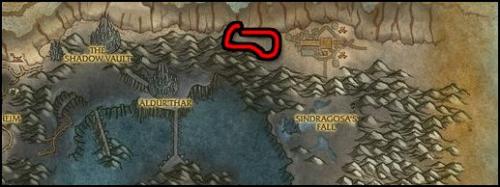
  4. Simple lap around Sholazar Basin for saronite ore.
    • 912 Downloads
    Submitted
  5. This path is a broad loop of Howling Fjord in Northrend and yeilds close to 8 stacks per hour.
    • 800 Downloads
    Submitted
  6. Just made this profile and decided to share it :) Works good for me.
    • 1336 Downloads
    • 3 Comments
    Updated

Account

Navigation

Search

Search

Configure browser push notifications

Chrome (Android)
  1. Tap the lock icon next to the address bar.
  2. Tap Permissions → Notifications.
  3. Adjust your preference.
Chrome (Desktop)
  1. Click the padlock icon in the address bar.
  2. Select Site settings.
  3. Find Notifications and adjust your preference.