



Skip to content
View in the app

A better way to browse. Learn more.

WRobot

A full-screen app on your home screen with push notifications, badges and more.

To install this app on iOS and iPadOS
  1. Tap the Share icon in Safari
  2. Scroll the menu and tap Add to Home Screen.
  3. Tap Add in the top-right corner.
To install this app on Android
  1. Tap the 3-dot menu (⋮) in the top-right corner of the browser.
  2. Tap Add to Home screen or Install app.
  3. Confirm by tapping Install.

Hunter Beast Master 7.1.5 007

(2 reviews)

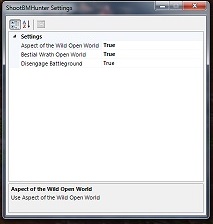
2 Screenshots

7.1.5 BM Hunter

Build 007 - James Bond Build :)

  • Bestial Wrath - Option ON or OFF CD Open World
  • Aspect of the Wild - Option ON or OFF Open World
  • Fix Bestial Wrath PvP
  • Fix Bestial Raid
  • Fix Aspect of the Wild PvP
  • Fix Aspect of the Wild Raid
  • Multi-Shot better

Build 006 Raid Ready

  • Fix Rotation for Raid and Dongeons
  • Best build
  1. Dire Stable or wait of the cobra ( Focus your choice )
  2. Dire Frenzy
  3. You Choice
  4. Bestial Fury
  5. Your Choice
  6. A Murders of Crows
  7. Killer Cobra
  • Survival pvp better

Build 005

  • Debug and tune up

Build 004

  • Stampede PVP
  • Intimidation PVP
  • Fix :Dire Beast :Basilisk

Build 003

  • Fix :Dire Beast :Hawk

Build 002

PVP Support

  • Dire Beast :Hawk
  • Dire beast :Basilisk
  • Spider Sting

PVE Support

  • 15 ALL
  • 30 Chimeara shot (dont work)
  • 45 ALL
  • 60 ALL
  • 75 Player
  • 90 Barrage (dont work)
  • 100 ALL

What's New in Version 007

Released

fdfs

User Feedback

You may only provide a review once you have downloaded the file.

   0 of 3 members found this review helpful 0 / 3 members

не работает профиль ! Фейк !

   1 of 1 member found this review helpful 1 / 1 member

Tnx for  the profile  friend. Working good 

Account

Navigation

Search

Search

Configure browser push notifications

Chrome (Android)
  1. Tap the lock icon next to the address bar.
  2. Tap Permissions → Notifications.
  3. Adjust your preference.
Chrome (Desktop)
  1. Click the padlock icon in the address bar.
  2. Select Site settings.
  3. Find Notifications and adjust your preference.