




Skip to content
View in the app

A better way to browse. Learn more.

WRobot

A full-screen app on your home screen with push notifications, badges and more.

To install this app on iOS and iPadOS
  1. Tap the Share icon in Safari
  2. Scroll the menu and tap Add to Home Screen.
  3. Tap Add in the top-right corner.
To install this app on Android
  1. Tap the 3-dot menu (⋮) in the top-right corner of the browser.
  2. Tap Add to Home screen or Install app.
  3. Confirm by tapping Install.

[N] Zul'Drak 74 - 80 by slk 2.0.0

(3 reviews)

1 Screenshot

Hello!

Neutral Zul'Drak grinder profile 74 - 80.

I was using this profile for dinging bots to lvl 80 after couple days of Borean Tundra farm.

Got repair/sell vendor & mailbox support.

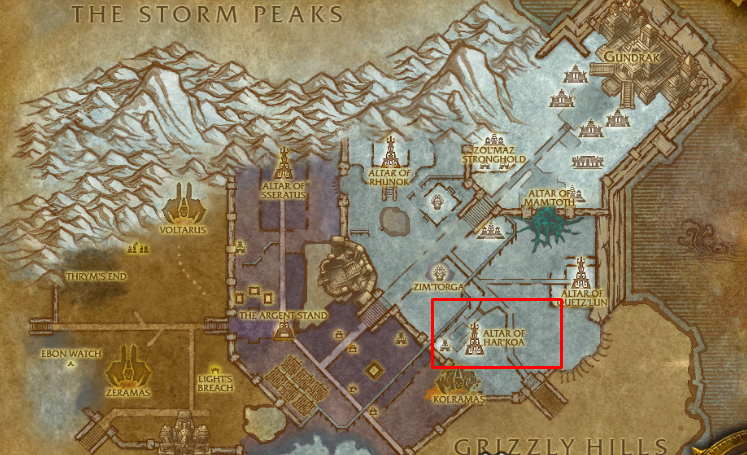
Areas of farm you can see on the pics.

You are welcome to submit any feedback.

P.S.
I've been using this profile for loads of characters and not only for leveling, but also for gold-farming.

Average farming stats:
6 hours

2k - 3.5k gold from grays/whites/greens/blues.


What's New in Version 2.0.0

Released

User Feedback

Recommended Comments

tdog3333

Members

Was working great at first but I fall into that huge Pit under altar of mam'toth every time ?

slk

WRobot user

On 4/16/2019 at 7:04 PM, tdog3333 said:

Was working great at first but I fall into that huge Pit under altar of mam'toth every time ?

Hello tdog3333!
Sorry to hear you having problems!
Could you please attach screenshots and coordinates?

It works for me 14 hours a day every day for more than a year just perfect!

So let's see what is causing the issue.

Regards,
slk

shadowpartner

Members

Hey, I just get the bot running the route, but doesn't attack anything? I'm using a fight class that works fine with other routes.

slk

WRobot user

On 5/16/2019 at 3:05 PM, shadowpartner said:

Hey, I just get the bot running the route, but doesn't attack anything? I'm using a fight class that works fine with other routes.

Hey!
Did it get to the destination of farm area?

Regards,
slk

shadowpartner

Members

On 5/21/2019 at 9:24 AM, slk said:

Hey!
Did it get to the destination of farm area?

Regards,
slk

Yeah it gets to the farm area, and runs the route but does not attack.

antisnake

Members

this runs to borean thundra but its a zul drak profile?

edit: fixed it by editing the russian zone name to Zul'Drak ?

BIRDIE13

Members

On 4/16/2019 at 6:04 PM, tdog3333 said:

Was working great at first but I fall into that huge Pit under altar of mam'toth every time ?

Get the same problem

Syberis

Members

On 9/25/2019 at 11:37 PM, BIRDIE13 said:

Get the same problem

Same here!


slk

WRobot user

Hello everyone!
I've uploaded version 2.

It is 100% AFK, works without getting stuck, Alliance+Horde friendly.


shlord

Members

18 hours ago, slk said:

Hello everyone!
I've uploaded version 2.

It is 100% AFK, works without getting stuck, Alliance+Horde friendly.


ty. dinged 80 with previous version, some weird stucks/deads.. but was really smooth.. this one i will try for sure with my next toon. 


ZknB

Members

Hi there.
Bot led the character to the area no problemo.
Runs circles (can see the navigator) until it dies after being hit too many times... Any fix ?
Using AIO as Fight Class, worked well with other profiles/products.
Thanks!

Edit : I unchecked "Ignore fights when traveling" and checked "attack before being attacked".
It isn't changing the behavior

Edit 2 : seems to be fixed by unchecking the other option in advanced options/mount options/"ignore fighting if in ground mount".
It is weird there are 2 options seemingly doing the same thing...


Works! 👍
 

Zaza34

Members

On 4/16/2019 at 6:04 PM, tdog3333 said:

Was working great at first but I fall into that huge Pit under altar of mam'toth every time ?

same here 😕


Create an account or sign in to comment

Account

Navigation

Search

Search

Configure browser push notifications

Chrome (Android)
  1. Tap the lock icon next to the address bar.
  2. Tap Permissions → Notifications.
  3. Adjust your preference.
Chrome (Desktop)
  1. Click the padlock icon in the address bar.
  2. Select Site settings.
  3. Find Notifications and adjust your preference.
