




Skip to content
View in the app

A better way to browse. Learn more.

WRobot

A full-screen app on your home screen with push notifications, badges and more.

To install this app on iOS and iPadOS
  1. Tap the Share icon in Safari
  2. Scroll the menu and tap Add to Home Screen.
  3. Tap Add in the top-right corner.
To install this app on Android
  1. Tap the 3-dot menu (⋮) in the top-right corner of the browser.
  2. Tap Add to Home screen or Install app.
  3. Confirm by tapping Install.

[Shai]MutilateRogue 1.0

(2 reviews)

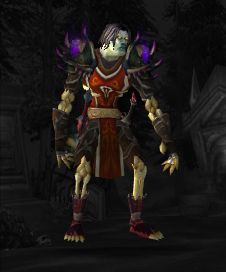
1 Screenshot

Mutilate Rogue FightClass (Optimized for Grinding 85-90)

Talents used:

  • Shadow Focus (Only 10 energy cost for opener)
  • Nerve Strike (50% reduced damage incoming for a few seconds)
  • Leeching Poison (Selfheal)
  • Cloak and Dagger (Get to your target very fast)
  • Dirty Tricks (No energy cost for Gouge)


    Offensive:

    1. Apply Deadly & Leeching Poison if buff is missing.
    2. Use Sprint if target is >30yds away.
    3. Stealth when target in <20yd range even when mounted.
    4. Cheapshot when target <20yd range (Cloak and Dagger).
    5. Use combo points for Slice and Dice & Recuperate and keep them both up.
    6. Kick if target is casting. Gouge if Kick is on cooldown. Kidney Shot with >1 combo point if Gouge is on cooldown. (heavy caster lockdown)
    7. When proc or <35% health target, use Dispatch.
    8. When buffs up, use combo points for Envenom.
    9. Use Mutilate to build up combo points.
    10. [AGAINST HOSTILE PLAYERS (ALLIANCE/HORDE)] Use Vendetta and Shadow Blades. Since I did not need it for Mobs, it destroys any enemy player :).

    Defensive:

    [*]Use Evasion at <80% Health.

    [*]Use Shiv (with Leeching Poison) at <75% Health to regain 5% maximum Health instantly.

    [*]Use Cloak of Shadows at <70% Health when target is casting a spell.

    [*]Use Vanish at <35% Health.

    [*]Use Preparation if Vanish and Evasion are on cooldown.

    Any Feedback is appreciated. I used that profile to grind from 85 to 90 killing turtles in the Valley of Four Winds and then grinding in Townlong Steppes using Towlong 88-90 Lower Sumprushes [8ball] 1.0 from http://wrobot.eu/user/1346-da8ball]da8ball

    Hope you guys enjoy it! Got FightClasses for Arms Warrior and Shadow Priest as well, but I still modify things a bit.

    EDIT: File unchanged, had to change Description.

What's New in Version 1.0

Released

  • -File unchanged, just edited Description

User Feedback

Recommended Comments

Shai

Members

I forgot to mention what glyphs I am using.

MutiRogue.jpg

therabbi98

Members

thanks so much, this is how all fighting profiles should be described :)

pmpaul

Members

Thanks for your efforts, amazing profile!


Only thing I've added is "Shadow Walk":


    <FightClassSpell>

      <SpellName>Shadow Walk</SpellName>

      <FightClassConditions>

        <FightClassCondition>

          <ContionType>Buff</ContionType>

          <Param xsi:type="FightClassConditionStringBool">

            <Name>Stealth</Name>

            <Need>true</Need>

          </Param>

        </FightClassCondition>

        <FightClassCondition>

          <ContionType>Buff</ContionType>

          <Param xsi:type="FightClassConditionStringBool">

            <Name>Shadow Walk</Name>

          </Param>

        </FightClassCondition>

      </FightClassConditions>

      <Priority>7</Priority>

      <IsBuff>true</IsBuff>

      <Timer>6000</Timer>

    </FightClassSpell>
 
To enable increased stealth when available.

loves2spooge

Elite user

Really great profile. I only changed cheapshot to ambush since he was attacking people that were flying and it was stunning them in the air...causing issues. I also didn't mind the extra damage taken since I am reasonably geared.


Spooge

Account

Navigation

Search

Search

Configure browser push notifications

Chrome (Android)
  1. Tap the lock icon next to the address bar.
  2. Tap Permissions → Notifications.
  3. Adjust your preference.
Chrome (Desktop)
  1. Click the padlock icon in the address bar.
  2. Select Site settings.
  3. Find Notifications and adjust your preference.