



Skip to content
View in the app

A better way to browse. Learn more.

WRobot

A full-screen app on your home screen with push notifications, badges and more.

To install this app on iOS and iPadOS
  1. Tap the Share icon in Safari
  2. Scroll the menu and tap Add to Home Screen.
  3. Tap Add in the top-right corner.
To install this app on Android
  1. Tap the 3-dot menu (⋮) in the top-right corner of the browser.
  2. Tap Add to Home screen or Install app.
  3. Confirm by tapping Install.

[FREE] Weapon Upgrade Plugin 1.1.1

(2 reviews)

2 Screenshots

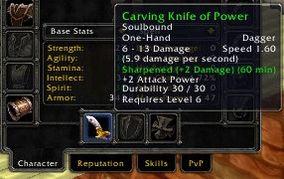
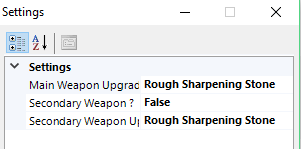
This plug-in allow you to specify which upgrade the bot should apply on your weapon by using Plug-in Settings. 

The bot will then check if you are not in combat or dead and if you don't already have a buff on your weapon, and then it will apply the specified upgrade like Sharpening Stone. 

Only tested on Wow Vanilla Serveur 1.12.1

This plug-in is based on @Skalikas Fishing Lure plug-in with few adjustments. 

Of course you will need to have the necessary upgrade item in your inventory. Bot will scan your inventory to check and apply the upgrade

What's New in Version 1.1.1

Released

Fixed dual weapon upgrade

User Feedback

You may only provide a review once you have downloaded the file.


This is really good for poisons until it runs out of poisons to apply, then it somehow finds a way to delete my offhand weapon ? has deleted 2 blues already

   1 of 1 member found this review helpful 1 / 1 member

Good Job Soshius !! Thanks

Account

Navigation

Search

Search

Configure browser push notifications

Chrome (Android)
  1. Tap the lock icon next to the address bar.
  2. Tap Permissions → Notifications.
  3. Adjust your preference.
Chrome (Desktop)
  1. Click the padlock icon in the address bar.
  2. Select Site settings.
  3. Find Notifications and adjust your preference.
