



Skip to content
View in the app

A better way to browse. Learn more.

WRobot

A full-screen app on your home screen with push notifications, badges and more.
To install this app on iOS and iPadOS
  1. Tap the Share icon in Safari
  2. Scroll the menu and tap Add to Home Screen.
  3. Tap Add in the top-right corner.
To install this app on Android
  1. Tap the 3-dot menu (⋮) in the top-right corner of the browser.
  2. Tap Add to Home screen or Install app.
  3. Confirm by tapping Install.

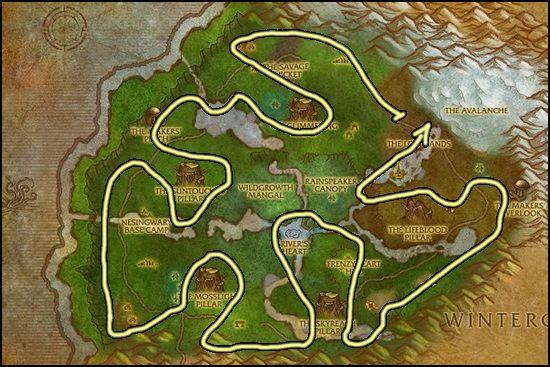
Sholazar Saronite [Flying Mount] 3.3.5

(1 review)

1 Screenshot

Hello!

This is my first gatherer profile, works fine. The only issue I noticed it seems to skip rich Saronite nodes, but I'm not sure why. 

User Feedback

You may only provide a review once you have downloaded the file.

   3 of 3 members found this review helpful 3 / 3 members

Works fine but sometimes some stuttering...


Its like the bot cannot decide which node he wants to go to... how can I fix this? Some ideas?

and nodes in the water arent gathered because the bot tries to fly into the water straight without dismounting...


otherways great route , also bypassing mob groups ?

Response from the author:

I had the same issue with the water, but I couldn't solve the problem. I'm not a pro botter after all, sorry I can't help you. But hey, I was using this profile and it made me some nice money still!

Account

Navigation

Search

Search

Configure browser push notifications

Chrome (Android)
  1. Tap the lock icon next to the address bar.
  2. Tap Permissions → Notifications.
  3. Adjust your preference.
Chrome (Desktop)
  1. Click the padlock icon in the address bar.
  2. Select Site settings.
  3. Find Notifications and adjust your preference.
