DarkMorc
Members
-
Joined
-
Last visited
-
yea it worked after getting this error the first time, and now i got it 3 times, but it worked sometimes. but now the first time it doesnt work for 15 minutes straight
-
aight
-
Hey, problem only occurs when Grinding next to SW. Bot runs to SW, turns around goes back to grinding, runs back and seems to have path finding problems. 2 Chars same issue, only humans and this special location 15 Jun 2022 16H30.log.html
-
-
When the bot slides down and he isnt in range -> Gather sucessful When the bot HAS mining on 400 and tries to gather 425 ore (which isnt possible) 21:44:54 - [Farming] Farm Reiche Saronitablagerung > 6084,56 ; 4079,1 ; -46,7275 ; "None" 21:45:03 - [Mount] Dismount 21:45:07 - [Farming] Farm successful He does not detect it properly.
-
I use the basic settings , didn't change anything.
-
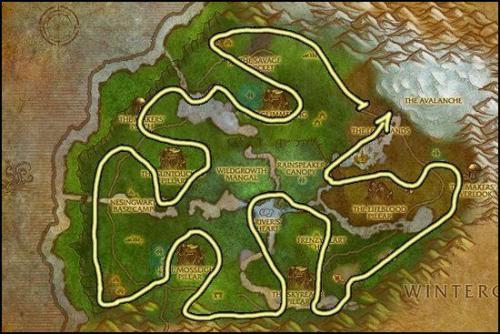 Works fine but sometimes some stuttering... Its like the bot cannot decide which node he wants to go to... how can I fix this? Some ideas? and nodes in the water arent gathered because the bot tries to fly into the water straight without dismounting... otherways great route , also bypassing mob groups ?
 -
mostly happening on an ore which is planted down hill , but instead of just running to the vein , the bot tries without walking 1 step , and then mounting up and flying to the next one
-
Exact problem , not fixed still after 3 years. I have the smallest flying mount possible. Did all things you suggested me. Looks totally obvious and I loose 30% of the ore because of that bug
-
Constantly spamming this error : E] 14:33:54 - System.ComponentModel.Win32Exception (0x80004005): Ungültiges Fensterhandle
-
Not really working. Sadly ? I put the Interaction ms to 600-900ms and sometimes it just flies into the nodes without looting anything , gets stuck somewhere like it tries to fly through a roof when the saronite is under that , and it flies into huge mob groups which cannot be killed properly as a hunter. Moreover the profile leads through some saronite that is placed within groups of elites. Can you maybe help me to get this to work properly? Edit , Thanks for the answer , but I play a hunter which is hard to bot with since there is no moving to get range. Moreover I experienced this issue that wrobot and not your route has , but atleast it would be better if you could blacklist the elite groups and maybe fly more precisely to prevent wrobot from flying at the orb and slipping down missing it completely. Thanks for the answer dude!
-
-
-
-
 That dude is absolutely sick. I messaged him and 20 minutes later he added items to the plugin and released a new plugin based on my thoughts. 5 stars!
- 1 comment
- 4 reviews
-
-

- 1
-
-
Since the new update my bots idle a lot , actions aren't completed because pathfinder is taking its time : [N] 17:59:19 - [Path-Finding] Path Count: 408 (22332,85y, 87627ms) (resultPartial=True, resultSuccess=True (more info with server log option)) [N] 17:59:56 - [Path-Finding] Path Count: 257 (11846,32y, 37095ms) (resultPartial=True, resultSuccess=True (more info with server log option)) [N] 18:00:16 - [Path-Finding] Path Count: 568 (22929,16y, 9419ms) 22 Sep 2018 17H02.log.html
-
@Ordush@Droidz Automaton does work without any errors , Quester doesnt work. Still getting these tons of errors. All the time as well
-
I try it now^^