




Use Case:
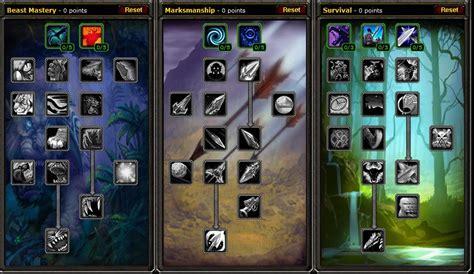
You level your character but something keeps you checking it, preventing you from the ultimate AFK experience that all these Quester/Grinder seller promise you. You guess it right, its the talent assignment.
Features:
- Assign Talents for the primary spec
- All Trees are configureable
- Pet talents also configureable
- You can configure the order of trees to be skilled
How it works:
In the plugin settings you can find options for all 4 trees (Tree 1-3 and Pet). The format follows the these rules:
- The order is from left to right, appended by the next row
- Each character in the sequence is the number of points that you want to assign to that talent, i. e. 0-5.
Example:
The configuration for the retribution paladin tree: https://truewow.org/talent-calculator#sVVzZVZVfbtbIuhdIfsu
FirstTree = 3
SecondTree = 2
ThirdTree = 1
Tree1 = 050501
Tree2 = 05
Tree3 = 05232051203331302133231331
Note: Tested for 3.3.5, but the API calls that are used also exist in Cata, TBC and Vanilla. I don't know if it works for other versions.
Cheers!
You may only provide a review once you have downloaded the file.
There are no reviews to display.