




SmartMove - ground movement that looks hand-steered
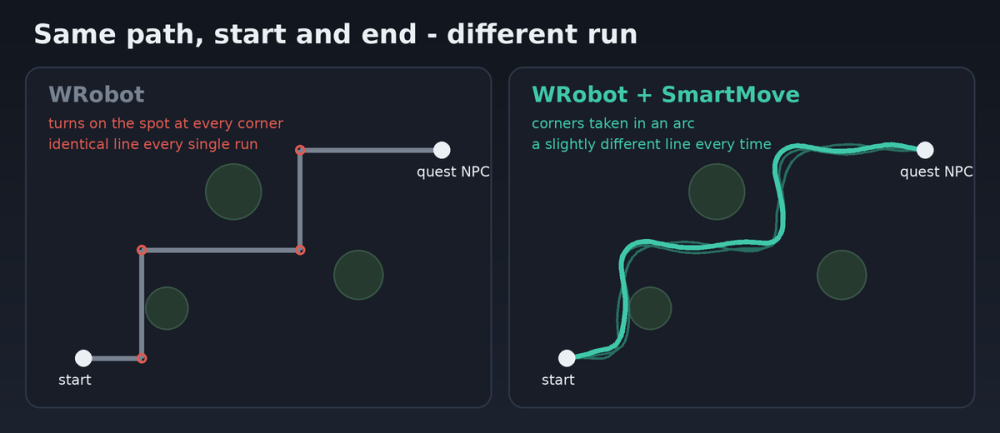
Bots run like bots: a dead-straight line, a turn on the spot at every corner, and the exact same line every time.
SmartMove fixes that for any product. It was made for Wholesome Auto Quester, but it doesn't touch the product at all. It only reshapes the paths WRobot is about to walk.
What it does
- Rounds corners: turns start a few yards early and follow an arc instead of snapping round.
- Wanders: the line drifts slightly to one side and back, differently on every run.
- Jumps now and then: an occasional jump (sometimes a double) on a straight stretch, never in combat.
- Keeps start and end points exact, so quest objects, NPCs and loot are reached the same as before.
- Checks the ground and line of sight on every change, and if a shifted point would hit a wall, fence or drop, that point stays where WRobot put it.
Left alone on purpose
- Flying and swimming
- Short moves in a fight (to the mob, into range)
- Indoors and caves (narrow doorways)
- Hops under 10 yards (looting, interacting)
Install
1. Copy SmartMove.cs into WRobot\Plugins
2. Tick it in the Plugins tab
3. Optional: change the settings with the plugin's Settings button
Settings
- Corner rounding: default 3 yd (0 = WRobot's own corners)
- Wander: default 1.5 yd (over 2 risks edges and fences)
- Jump every: 35-140 seconds, or turn jumping off
- Leave fights alone / Leave indoors alone: on by default
- Debug lines: logs every path it reshapes
The log shows the first few reshaped paths, then a short summary every 2 minutes, for example "12 path(s) reshaped, 3 jump(s)". That way you can see it's working without flooding the log.
Tested on 3.3.5a. Bug reports and feedback welcome, and a log helps a lot.
What's New in Version 1.0.2
Released
Further improvements to movement
You may only provide a review once you have downloaded the file.
There are no reviews to display.