



Skip to content
View in the app

A better way to browse. Learn more.

WRobot

A full-screen app on your home screen with push notifications, badges and more.

To install this app on iOS and iPadOS
  1. Tap the Share icon in Safari
  2. Scroll the menu and tap Add to Home Screen.
  3. Tap Add in the top-right corner.
To install this app on Android
  1. Tap the 3-dot menu (⋮) in the top-right corner of the browser.
  2. Tap Add to Home screen or Install app.
  3. Confirm by tapping Install.

Power Leveling Route Syinide 1.0

(3 reviews)

1 Screenshot

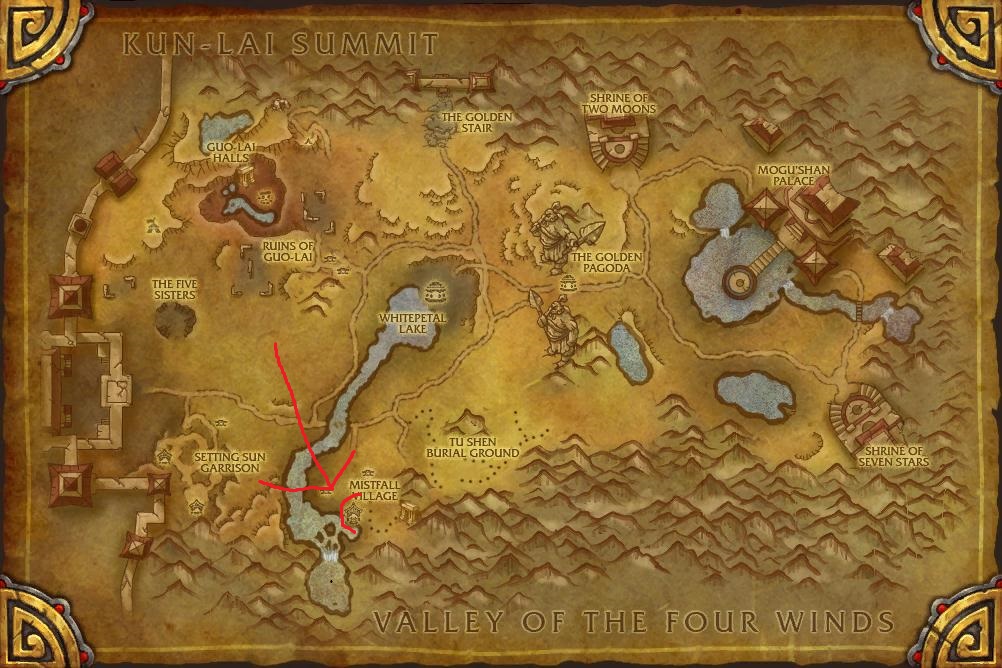
So this is a very small profile I made that I use to power level my pets.

I have the profile set up to only fight the Strider pets which are aquatic so it is highly recommended that you use Flying against them or pets that have good self healing abilities so the bot can run for as long as it possibly can.

The LUA code that you absolutely need is:

local PetAlly = 1;

local PetEnemy = 2;

local activePetEnemy = C_PetBattles.GetActivePet(PetEnemy);

local typePetEnemy = C_PetBattles.GetPetType(PetEnemy, activePetEnemy);

local activePetAlly = C_PetBattles.GetActivePet(PetAlly);

local typePetAlly = C_PetBattles.GetPetType(PetAlly, activePetAlly);

if activePetAlly == 1 and not (C_PetBattles.GetHealth(PetEnemy, activePetEnemy) == C_PetBattles.GetMaxHealth(PetEnemy, activePetEnemy) ) then

for i = 1, NUM_BATTLE_PETS_IN_BATTLE do

if C_PetBattles.GetHealth(PetAlly, i) > 0 and not ( i == activePetAlly) then

C_PetBattles.ChangePet(i);

break;

end

end

end

What this does is that it will make the pet that is first in your party swap out after it takes damage.

The pet you want the power level absolutely needs to be in slot 1. And from personal experience I highly highly recommend that you do a few battles yourself to level it up to 7+ so that it is able to take a hit or two if the LUA code bugs out or something.

If there's anything wrong with it just lemme know!

Lemme get some reviews people!

User Feedback

Recommended Comments

da8ball

Elite user

Great profile!


It doesnt swap 100%, but still awesome way to level.

Syinide

Members

Thanks! I've asked Droidz and so has many other people for a working flawless LUA code but there isn't one atm unless you know how to write it to swap after one skill.

Pulsare

Members

Simply amazing! Agree with da8ball, doesn't swap all the time, but it is awesome for what it is :)

SephBlades

Members

EDIT: Got it working.


But i don't get this: Other wild pets are lvl.25. They one shot almost mine, so how you level up them? :/

reefer75

Members

EDIT: Got it working.


But i don't get this: Other wild pets are lvl.25. They one shot almost mine, so how you level up them? :/

level them up manually or it says in notes min.level 7 " I highly highly recommend that you do a few battles yourself to level it up to 7+ so that it is able to take a hit or two if the LUA code bugs out or something."

testing it out now

Syinide

Members

I haven't had an opportunity to test this since WoD has been launched but I don't see why it wouldn't work. Any problems just lemme know and i can work on fixing them.

gerardomartinez

Members

Having mad issues. He ends up flying around in circles?

Syinide

Members

Whenever I use it i disable all mounts and disable loot mobs, attacking mobs etc etc. So basically my toons only option is to do pet battles.

sid905

Members

how do i make this profile

Syinide

Members

Not sure what you mean by "making" this profile. You stick it in the Pet Battle profile folder and select it in the bot. Follow the instructions up top and you should be good to go. I just finished leveling 2 toons to 92 with this along with a friend of mine just finishing his 3rd this way.

reefer75

Members

don't work for jade tentacle for some reason wont swap out the rest do great idk why nvm works perfect just had to change some moves on pet 

chapperz

Members

can't get any pet to swap out do i need to add the code text into profile or something?


NVM got it nice profile thanks


ildoctore

Members

i try to use the lua code but the bot dont change the first pet and it die... 

Account

Navigation

Search

Search

Configure browser push notifications

Chrome (Android)
  1. Tap the lock icon next to the address bar.
  2. Tap Permissions → Notifications.
  3. Adjust your preference.
Chrome (Desktop)
  1. Click the padlock icon in the address bar.
  2. Select Site settings.
  3. Find Notifications and adjust your preference.