



Skip to content
View in the app

A better way to browse. Learn more.

WRobot

A full-screen app on your home screen with push notifications, badges and more.

To install this app on iOS and iPadOS
  1. Tap the Share icon in Safari
  2. Scroll the menu and tap Add to Home Screen.
  3. Tap Add in the top-right corner.
To install this app on Android
  1. Tap the 3-dot menu (⋮) in the top-right corner of the browser.
  2. Tap Add to Home screen or Install app.
  3. Confirm by tapping Install.

[SSANDEFER] PROTECTION PALADIN PVP FOR 6.1.2 1.0

(0 reviews)

1 Screenshot

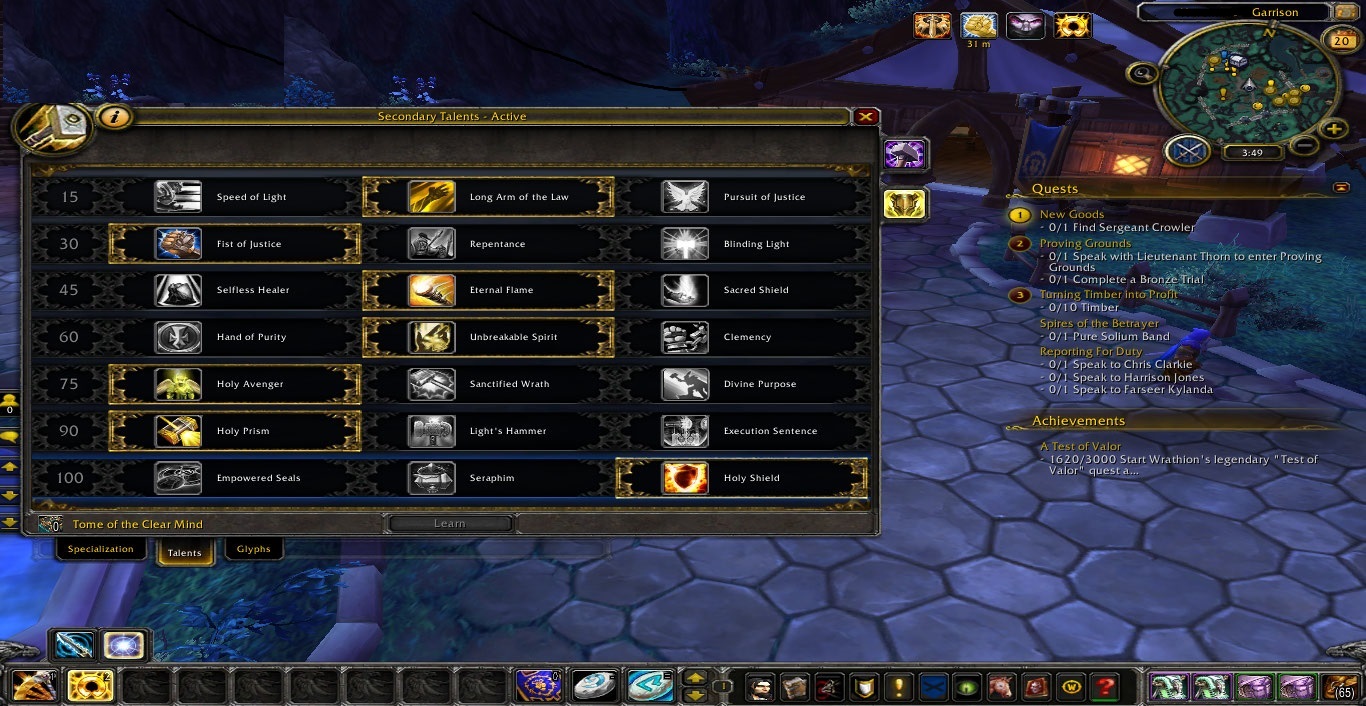
HELLO ALL. I JUST RECENTLY JOINED THE WROBOT COMMUNITY AND I WOULD LIKE TO SHARE WITH YOU MY CUSTOM FIGHT CLASS. THIS IS A PROTECTION PALADIN PVP FIGHT CLASS. IT INCLUDES ALL BASIC PVP FUNCTION WITH SOME MINOR OFF HEALING WITH ETERNAL FLAME AND HOLY PRISM. I'M CURRENTLY TESTING THIS IN BG'S AND ARENA AND I'VE HAD SOME DEGREE OF SUCCESS. PLEASE FEEL FREE TO COMMENT AND LET ME KNOW HOW AND IF I CAN MAKE THIS BETTER. YOUR CRITICISM IS APPRECIATED AND I WILL DO MY BEST TO MAKE THIS THE BEST PVP FIGHT CLASS AS POSSIBLE. I'VE INCLUDED A SCREENSHOT OF THE REQUIRED TALENTS FOR THIS BUILD. THANK YOU.

What's New in Version 1.0

Released

  • 5/20/15-UPLOADED

User Feedback

Recommended Comments

Bugreporter

Members

Oh, did you have a new keyboard? CAPS_LOCK only ?  ;-)

ssandefer

Members

Sorry was tired and brain wrecked lol

Create an account or sign in to comment

Account

Navigation

Search

Search

Configure browser push notifications

Chrome (Android)
  1. Tap the lock icon next to the address bar.
  2. Tap Permissions → Notifications.
  3. Adjust your preference.
Chrome (Desktop)
  1. Click the padlock icon in the address bar.
  2. Select Site settings.
  3. Find Notifications and adjust your preference.