



Skip to content
View in the app

A better way to browse. Learn more.

WRobot

A full-screen app on your home screen with push notifications, badges and more.

To install this app on iOS and iPadOS
  1. Tap the Share icon in Safari
  2. Scroll the menu and tap Add to Home Screen.
  3. Tap Add in the top-right corner.
To install this app on Android
  1. Tap the 3-dot menu (⋮) in the top-right corner of the browser.
  2. Tap Add to Home screen or Install app.
  3. Confirm by tapping Install.

Pathrunner Hunter 1.0.0

(0 reviews)

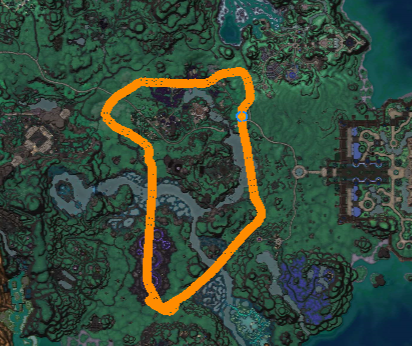
1 Screenshot

This is a simple profile that I made yesterday. The mount dropped in about 2 hours of farming.

*You will need Flying mount to use the profile.
*Don't need to monitor, this mob is soloable ( Health: 539,280)
*Pathrunner drops Swift Breezestrider

You can start grinder anywhere in shadowmoon valley(draenor)

Happy hunting!

User Feedback

Recommended Comments

chapperz

Members

could you please add more info ground mount flying mount? Do we need to monitor the profile and click the portal? what mount is this for?

No Heart

Members

20 hours ago, chapperz said:

could you please add more info ground mount flying mount? Do we need to monitor the profile and click the portal? what mount is this for?

Flying Mount
Don't need to monitor, this mob is soloable ( Health: 539,280)

Pathrunner drops Swift Breezestrider
 

mikamarine

Members

Héllo ! I check Grinding in the bot..

Where is place your profils ?

No Heart

Members

4 hours ago, mikamarine said:

Héllo ! I check Grinding in the bot..

Where is place your profils ?

Hello. If I understood your doubt...
You need to put this profile in \WRobot\Profiles\Grinder directory

Account

Navigation

Search

Search

Configure browser push notifications

Chrome (Android)
  1. Tap the lock icon next to the address bar.
  2. Tap Permissions → Notifications.
  3. Adjust your preference.
Chrome (Desktop)
  1. Click the padlock icon in the address bar.
  2. Select Site settings.
  3. Find Notifications and adjust your preference.