Skip to content
View in the app

A better way to browse. Learn more.

WRobot

A full-screen app on your home screen with push notifications, badges and more.

To install this app on iOS and iPadOS
  1. Tap the Share icon in Safari
  2. Scroll the menu and tap Add to Home Screen.
  3. Tap Add in the top-right corner.
To install this app on Android
  1. Tap the 3-dot menu (⋮) in the top-right corner of the browser.
  2. Tap Add to Home screen or Install app.
  3. Confirm by tapping Install.

[PvE] Balance Druid Legion- d.large 1.0.1

(0 reviews)

Hi together,


here is my first Combat Routine for Balance Druid in Legion. For start, it's all right, I'll try to optimize the CR. Pls test.

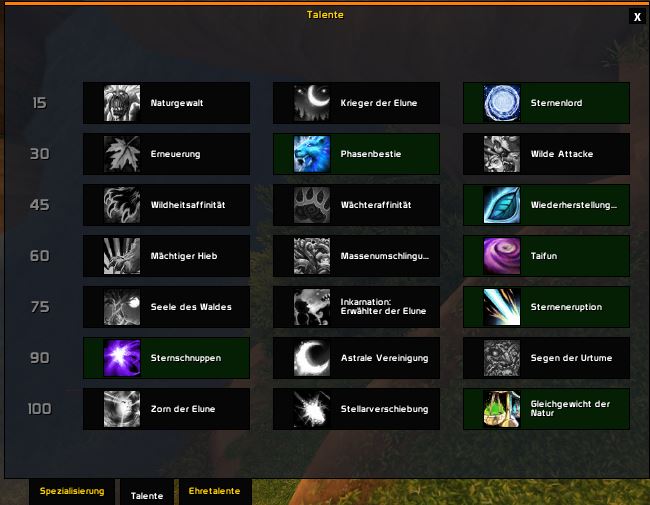
Talents in Screenshot.


cheers

d.large:biggrin:

Talente Druide.JPG


Quote

changelog v1.0.1

- added Healing Touch Spell

- added Typhoon Spell

- added Solar Beam Spell


What's New in Version 1.0.1

Released

Talents Balance Druid.JPG

User Feedback

Recommended Comments

qe61

Members

:biggrin:

hello there good work with the profile

but i faced issue, he only cast solar wrath and starsurge only, so he dont cast any thing else


Dlarge

Members

i have no probs, i will check this and optimizing this routine,thx.:cool:

Unbenannt.JPG

hugojiayiwang

Members

very nice profile!!!!


i just test it.. 

Do u interest in Restoration?

hugojiayiwang

Members

BTW 


I think there is a mistake.,


In the moon form spell > conditions> need (i think here is false not true which is in your profile)

Samy

Members

thanks a lot


Pasterke

Members

You realy use that ? That must be a joke.

What happens if you get out of moonkin form ? just die ? Because your check to cast Moonkin form is wrong.

Realy, healing touch at 85 % ? with alot of mobs the only thing he does is casting healing touch, until mana is gone and then die.

Solar beam on cooldown without a check ?

Starfall with no astral power ?

etc ....


Dlarge

Members

routine is old and this is my first routine.:blush:

raptor2619

Members

he wont stay in moonkin form 

Account

Navigation

Search

Search

Configure browser push notifications

Chrome (Android)
  1. Tap the lock icon next to the address bar.
  2. Tap Permissions → Notifications.
  3. Adjust your preference.
Chrome (Desktop)
  1. Click the padlock icon in the address bar.
  2. Select Site settings.
  3. Find Notifications and adjust your preference.