



Skip to content
View in the app

A better way to browse. Learn more.

WRobot

A full-screen app on your home screen with push notifications, badges and more.

To install this app on iOS and iPadOS
  1. Tap the Share icon in Safari
  2. Scroll the menu and tap Add to Home Screen.
  3. Tap Add in the top-right corner.
To install this app on Android
  1. Tap the 3-dot menu (⋮) in the top-right corner of the browser.
  2. Tap Add to Home screen or Install app.
  3. Confirm by tapping Install.

Black Barracuda Fishing 2

(1 review)

This is a small, relatively safe spot with lots of pools.


This runs up and down the north side of Suramar bay and farms the fast spawning pools there. Safe and pretty easy. 


Me
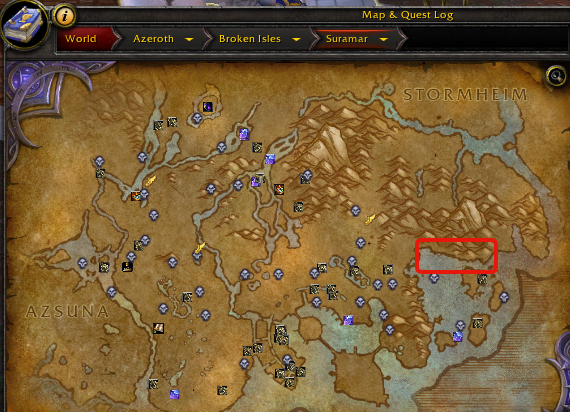
BB Fishing.png

What's New in Version 2

Released

Changed sides of the bay, and blacklisted the small island it ran to sometimes as there are elites there and.. not good :) 

BB Legion Fish.xml

User Feedback

You may only provide a review once you have downloaded the file.

   2 of 2 members found this review helpful 2 / 2 members

Not working for me, the bot just dont run and stay on the same  side.. any idea? Would change if it could run :) 
(running it as fisherbot, obviously)

Account

Navigation

Search

Search

Configure browser push notifications

Chrome (Android)
  1. Tap the lock icon next to the address bar.
  2. Tap Permissions → Notifications.
  3. Adjust your preference.
Chrome (Desktop)
  1. Click the padlock icon in the address bar.
  2. Select Site settings.
  3. Find Notifications and adjust your preference.