





Skip to content
View in the app

A better way to browse. Learn more.

WRobot

A full-screen app on your home screen with push notifications, badges and more.

To install this app on iOS and iPadOS
  1. Tap the Share icon in Safari
  2. Scroll the menu and tap Add to Home Screen.
  3. Tap Add in the top-right corner.
To install this app on Android
  1. Tap the 3-dot menu (⋮) in the top-right corner of the browser.
  2. Tap Add to Home screen or Install app.
  3. Confirm by tapping Install.

[A + H][Gatherer] Suramar West Gatherer 1.3.0

(10 reviews)

3 Screenshots

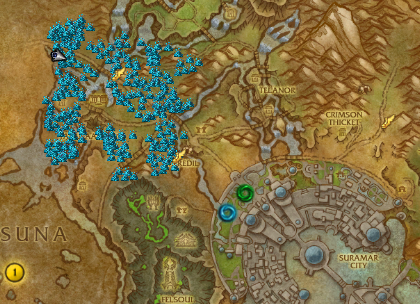
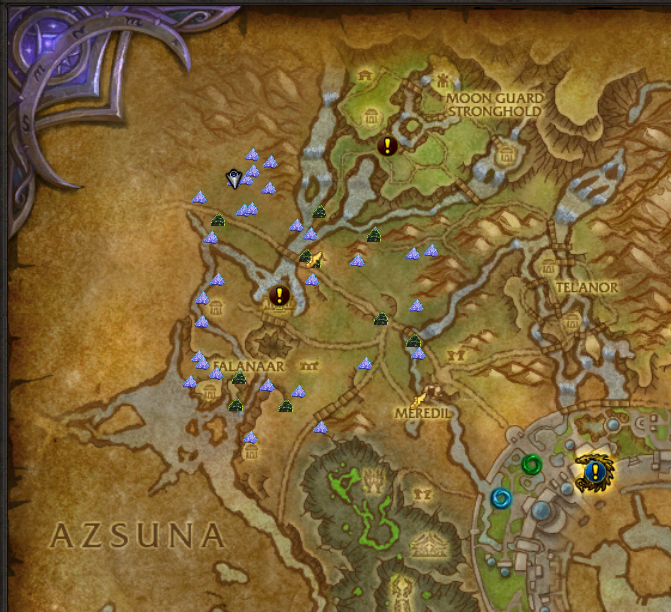
This loop is highlighted in a lot of the profession guides as a way to lvl herbalism and mining quickly.  As a result it can get BUSY so use the profile in a quiet time.

The bot can sometimes run off into Val' Sharah to chase nodes- i dont see any issues there however.


Loop is the screenshot- obviously you need to be 109-100 to run around in Suramar.

Bot can sometimes get a bit slower when you are full of mana crystals... il think of a way to spend them somehow. 

Enjoy!

What's New in Version 1.3.0

Released

1,1 Blacklisted some elite NPC's "elfbane" and his surrounds


1.2 more blacklisting and path correction 

1.3 even more blacklisting and path correction

User Feedback

You may only provide a review once you have downloaded the file.

There are no reviews to display.

Account

Navigation

Search

Search

Configure browser push notifications

Chrome (Android)
  1. Tap the lock icon next to the address bar.
  2. Tap Permissions → Notifications.
  3. Adjust your preference.
Chrome (Desktop)
  1. Click the padlock icon in the address bar.
  2. Select Site settings.
  3. Find Notifications and adjust your preference.