



Skip to content
View in the app

A better way to browse. Learn more.

WRobot

A full-screen app on your home screen with push notifications, badges and more.

To install this app on iOS and iPadOS
  1. Tap the Share icon in Safari
  2. Scroll the menu and tap Add to Home Screen.
  3. Tap Add in the top-right corner.
To install this app on Android
  1. Tap the 3-dot menu (⋮) in the top-right corner of the browser.
  2. Tap Add to Home screen or Install app.
  3. Confirm by tapping Install.

Feral Druid Legion 1.0.7

(3 reviews)

3 Screenshots

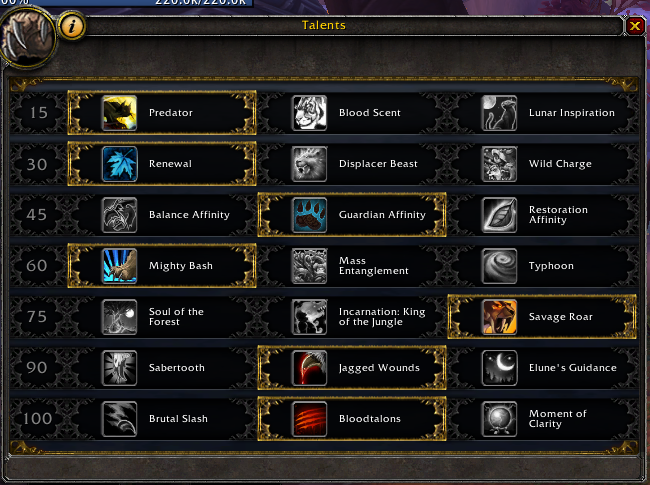
Probably the best feral routine you will get. Use the talents as shown in screenshot.

If you want to use it for raiding, you can use Lunar Inspiration also, but remember, for all non-raid purpose, you should take the talents as shown.

It was a painfull way to optimize the routine the way I wanted to getting max dps out of it.

Use it and give feedback if you think you have better options.

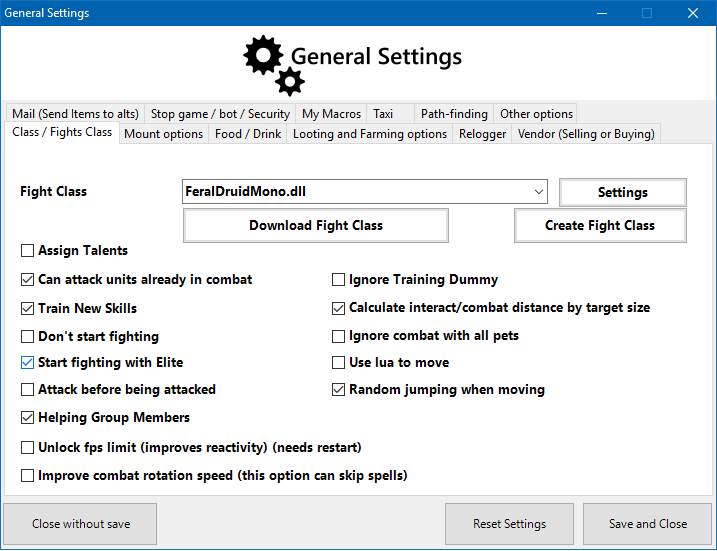
This is a .dll file, to load this routine, unpack it in your FightClass folder and open it like you load a .xml file. If you don't see the routine, make sure you enable show all files in the search window.

Enjoy :)

Tested in French Client and it's working as supposed.

What's New in Version 1.0.6

Released

Made it to work in other languages too.

Added settings so you can fine tune it.

Changed all spells to be cast by Id and not by Name.

Added an Bear Routine if you need to tank for a short period. (tank dead or dc ...). Switch to Bear Form and he will auto switch to Bear Spells until you switch back to Cat Form.

Sorry for the dll file, but it's needed to use my own forms and settings.

 

FeralDruidMono-03Nov2016.zip

User Feedback

You may only provide a review once you have downloaded the file.


How can I change it so the druid heals itself?

One of the biggest advantages of being a druid is the 3 different forms plus the ability to heal.

It seems like a huge part of the class is being wasted. 

I speaking in terms of PVP. 

I have only been using this for a few hours.


Very good,thx:biggrin: excellent!

   1 of 2 members found this review helpful 1 / 2 members

merci ça fonctionne nickel

Account

Navigation

Search

Search

Configure browser push notifications

Chrome (Android)
  1. Tap the lock icon next to the address bar.
  2. Tap Permissions → Notifications.
  3. Adjust your preference.
Chrome (Desktop)
  1. Click the padlock icon in the address bar.
  2. Select Site settings.
  3. Find Notifications and adjust your preference.