Droidz
Administrators
-
Joined
-
Last visited
Everything posted by Droidz
-
Your log file is the log of wrobot for 5.2.0?
-
Hi, If you found problems in new version please post problems here (only problems appear in new version, no the old problem).
-
WRobot is now compatible with the new version of wow (5.2.0.16650). This update of WRobot represents the end of the betas version. For the people who updated the bot and who plays on European server (thus those which are still in version 5.1.0) download this file, it should be extracted in the WRobot folder, when you launching WRobot click on "No" when the program request of you to update. ps: post problems here:
-
WRobot is now compatible with the new version of wow (5.2.0.16650). This update of WRobot represents the end of the betas version. For the people who updated the bot and who plays on European server (thus those which are still in version 5.1.0) download this file, it should be extracted in the WRobot folder, when you launching WRobot click on "No" when the program request of you to update. ps: post problems here:
-
Wait WRobot for 5.2.0 and say me if the problem is solved
-
Try to bind key "X" at "Sit/Move Down" wow key bindings. restart bot and say me if this as solved your problem
-
He, Can you share your log file please (in Logs folder)
-
Hi, Can you share your complet log file please. I'll try to fix this problem with update for wow 5.2.0 (if is an bot problem).
-
Hi, Don't forget to look facebook page of mmorobot for small news: https://www.facebook.com/MmoRobot
-
Hi, Don't forget to look facebook page of mmorobot for small news: https://www.facebook.com/MmoRobot
-
Avant de poster une demande d’aide ou un rapport de bug merci de : Vérifier que vous lancez bien wow en mode 32 bit. Vérifier que vous utilisez un session Windows avec les droits d'administrateur. Essayer de désactiver votre antivirus/parefeu. Supprimer totalement le dossier WRobot, de le télécharger de nouveau et de l’installer de nouveau. Si le bot ne fonctionne pas du tout, que WRobot ne répond plus changer la version de Directx que wow utilise (n’oublier pas de relancer Wow). Réinitialiser les raccourci clavier Wow (le bot utilise Avancer, Reculer, Sauter, Assis/Debout, décalage à droite, décalage à gauche mais je vous conseille de tout réinitialiser). Certain addon wow peuvent poser des problèmes, donc les désactiver tous. Réinstallez Framework 4.0, DirectX 9, DirectX 11, Redistributable Visual C + + 2010 (X86) et SlimDX (4.0 X86). Fermer les programmes comme TeamViewer, TeamSpeak (ils causent des bug si lancé en même temps que le bot). Faire une recherche, exemple : https://www.google.com/search?q=site:wrobot.eu+adding+mailbox Vous pouvez télécharger cette petit outils qui vous aidera a installer les applications requis: http://download.wrobot.eu/wrobot/others/WRobotRepairTools.exe Après avoir fait toute c’est étapes vous avez de grande chance que votre problème soit résolu, si ce n’est pas le cas postez une demande d’aide sur le forum, lisez ce poste pour faire votre demande correctement afin que votre demande soit traité le plus rapidement possible : - Mettre devant le titre du sujet le produit qui ne fonctionne pas correctement ([Grinder], [Gatherer], …) - Poster le fichier log de la session de WRobot qui a eu un problème, merci également de donner le profil et la Fight class utilisé - (pour envoyer des fichiers sur le forum, dans la création d’un nouveau sujet, en bas de la zone de texte ce trouve le bouton « Choose Files… » cliquez dessus et choisissez le fichier que vous voulez). - (Le log ce trouve dans le dossier « Logs » de WRobot.
-
Before request help, thank you to: Make sure you start wow in 32-bit and run Wow in Windowed mode. Make sure do you use WRobot on administrator Windows session. Keep Windows updated. Try to disable your antivirus/firewall, redownload and reinstall WRobot in empty folder. Delete completely WRobot folder, download and install it again (you can try to download preinstalled version). Try to put WRobot folder on your desktop and in root of the disc. (Re)Install DirectX, Framework (minimum 4.5) (or Framework Repair Tool), SlimDX (4.0 X86), Redistributable Visual C + + 2010 (X86). If the bot does not work at all, that WRobot freeze, change the version of DirectX that wow uses (do not forget to restart Wow) (if this don't resolve problem, you can try to launch WRobot with shortcut "WRobot No DX"). Reset key bindings Wow (the bot uses Forward, Backward, Jump, Sit / Stand, strafe right and left, but I suggest you reset everything). Some wow addon can cause problems, so disable all. Close Windows program like Skype, Teamviewer and all overlays e.g. Overwolf, Geforce Experience, raptr, AMD Gaming Evolved, teamspeak (these programs can cause problems at WRobot, also programs for record screen or programs which draw/write in game window). Close/disable your VPN, Proxy and program like ProxyCap. If you have already run WRobot, you can try to remove folde "WRobot\Data\Meshes\". If WRobot window is not display correctly, you can you try to Right-click on WRobot.exe and then click "Properties". On the "Compatibility" tab, select "Disable Display Scaling On High DPI Settings", and then click "OK" ( https://www.youtube.com/watch?v=0xS-UCuyq7s ). Some virus/malwares can block WRobot. Scan you computer AdwCleaner and/or Malwarebytes for remove malwares, and anti-virus like Eset or Kaspesky. Disable "Bliz Streaming" feature, for it, on the Battle.net App, go to upper left corner, click the down arrow, go to Settings. From there, go to Streaming and uncheck Enable Streaming. When WRobot is launched, you cannot minimize Wow, of course you can keep Wow in background and use your computer, but you cannot minize (put in taskbar) Wow (if minimized, WRobot don't works correctly). Sometime, you need to put "full control" at "WRobot.exe" (and WRobot folder): https://www.windowscentral.com/how-take-ownership-files-and-folders-windows-10 Do a search to see if a solution exists: https://www.google.com/search?q=site:wrobot.eu+adding+mailbox or http://wrobot.eu/search/. If you start to use bot, you can watch this video: http://wrobot.eu/forums/topic/3633-getting-started-with-wrobot-video/ If your problem is not resolved, request help on good forum, to get quick reply, don't forget to share your log file.
-
Hi, Do you have an wow addon changing the interface of the window archeology?
-
Sorry, reset to default your wow Key Bindings (wrobot use "Jump" and "Sit/Move Down" keys)
-
Can you try to reset your wow shortcuts Envoyé depuis mon MI 2 avec Tapatalk
-
In "spell settings" you put 'false' at "Check if know spell, is usable and good distance" and put timer at 3000 After In condition add "Target Distance" smaller at 40 Normally with this settings, Mind Flay works. I'll fix it in the next update.
-
Hi, This is not an bug. Try to reset your wow shortcuts and change directx version. After restart wow and wrobot then try again.
-
I have updated my last post (not completely finished). If an moderator can correct my orthographe please. ps: I have deleted your posts in this thread for put my post after the first tutorial.
-
Thanks, can you send me your log (with your fightclass loaded)? For the moment try to put "false" at the spell settings "Check if know spell, is usable and good distance" and add manually distance condition and timer.
-
-
Hi, Can you share your fight class please?
-
Hi, As twizt3dkitty has said try with different mount. If it don't solve problem remove your wrobot folder and reinstall it (don't edit settings and launch archeo bot).
-
Hello, Sorry, the WowRobot subscriptions will not be transferred, its already be on mmolazy.
-
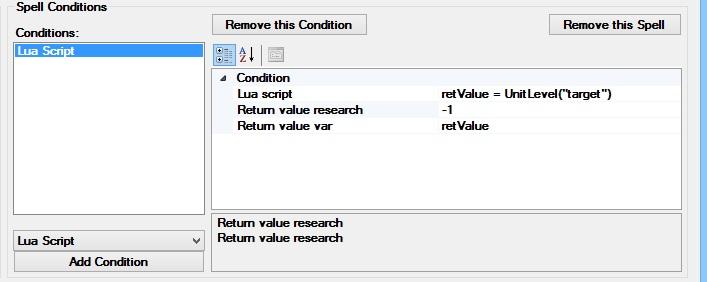
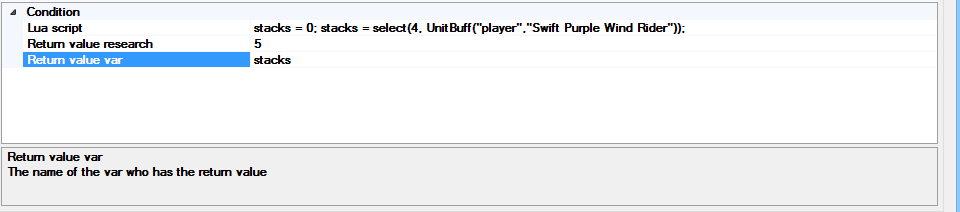
Condition Number: Pet Health Percent -> Percent health of your pet (0 to 100) Target Health Percent -> Percent health of your current target (0 to 100) Health Percent -> Your Percent health (0 to 100) Combo Point -> Your combo point Mana -> Your mana Rage -> Your Rage Focus -> Your Focus Energy -> Your Energy Chi -> Your Chi Runes -> Your Runes Runic Power -> Your Runic Power Soul Shards -> Your Soul Shards Eclipse -> Your Eclipse Holy Power -> Your Holy Power Alternate -> Your Alternate Dark Force -> Your Dark Force Light Force -> Your Light Force Shadow Orbs -> Your Shadow Orbs Burning Embers -> Your Burning Embers Demonic Fury -> Your Demonic Fury Arcane Charges -> Your Arcane Charges Target Distance -> Distance between your character and your current target Distance Pet To Target -> Distance between your pet and your current target Distance Me To Pet -> Distance between your character and your pet Me Level -> Your level Target Level -> The level of your current target Condition Unit Near: Hostile Unit Near -> Number of npc hostiles in the radius selected (radius starting at the position of your character) Unit Attack Player Near -> Number of npc attacking your character in the radius selected (radius starting at the position of your character) Hostile Unit Near Target -> Number of npc hostiles in the radius selected (radius starting at the position of your current target) Unit Attack Player Near Target -> Number of npc attacking your character in the radius selected (radius starting at the position of your current target) Condition String Bool: Buff -> Check if your character has buff (buff name in english, case sensitive) Target Buff -> Check if your target has buff (debuff) (buff name in english, case sensitive) Pet Buff -> Check if your pet has buff (debuff) (buff name in english, case sensitive) Know Spell -> Check if your know selected spell (spell name in english, case sensitive) Is Spell Usable -> Check if your selected spell is usable (spell name in english, case sensitive) Condition Bool: In Battleground -> True if the current map is an Battleground Have Target -> True if your character has currently an target Have Pet -> True if your character has an pet Me In Combat -> True if your character is in fight Me In Move -> True if your character moving Target In Move -> True if your target moving Pet In Move -> True if your pet moving Target In Cast -> True if your target casting spell or using item Pet In Cast -> True if your pet casting spell or using item Me In Cast -> True if your character casting spell or using item Target Is Player -> True if your current target is an player Target Is Summoned -> True if your current target is summoned (sample: pet) Target Pet Is My Target -> True if your character and your pet have same target Target Targeting Me -> True if your current target has for target your character Target Targeting Me Or My Pet -> True if your current target has for target your character or your pet Target Targeting My Pet -> True if your current target has for target your pet Target Is Elite -> True if your current target is an npc elite Target Is World Boss -> True if your current target is an npc world boss Me Is Stunned -> True if your character is stunned Target Is Stunned -> True if your current target is stunned Pet Is Stunned -> True if your pet is stunned Me Is Swimming -> True if your character is swimming Target Is Swimming -> True if your current target is swimming Pet Is Swimming -> True if your pet is swimming Me Is Flying -> True if your character is flying Target Is Flying -> True if your current target is flying Pet Is Flying -> True if your pet is flying Condition String: C Sharp Code -> C#.net code with acces at wManager.dll and robotManager.dll (sample: ObjectManager.Me.HealthPercent < 70 && ObjectManager.Me.HealthPercent > 50) Condition Item Number: Item Count -> Number of items (by item id) Condition Lua: Lua Script -> Lua script (with wow lua API) (sample: ) Condition Buff Stack: Buff Stack -> Number of stack by buff of your character (buff name in english, case sensitive) Buff Stack Target -> Number of stack by buff of your target (buff name in english, case sensitive) Buff Stack Pet -> Number of stack by buff of your pet (buff name in english, case sensitive) Samples conditions type here: Spell no found / don't works, reply here:

-
Hi, Can you post your log and used profile please