





saleh
-
Joined
-
Last visited
Posts posted by saleh
-
-
-
-
-
-
-
3 hours ago, Droidz said:
        List<String> ItemNames = new List<string>
        {
            "First Item",
            "second Item",
            //etc
        };

        foreach (string ItemName in ItemNames)
        {
            if(!wManager.wManagerSetting.CurrentSetting.DoNotSellList.Contains(ItemName))
                wManager.wManagerSetting.CurrentSetting.DoNotSellList.Add(ItemName);
        }
Thank you
Work Perfect
-
-
3 hours ago, Sye24 said:
List<String> ItemNames = new List<string>
{
  "First Item",
  "second Item",
  //etc
};

foreach (string ItemName in ItemNames)
{
  if(!wManager.wManagerSetting.CurrentSetting.DoNotSellList.Contains(ItemName))
    wManager.wManagerSetting.CurrentSetting.DoNotSellList.Add(itemName);
}
add your time to the list and run this as RunCode
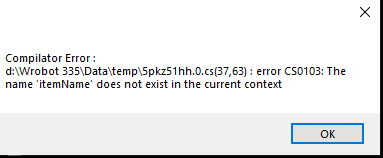
List<String> ItemNames = new List<string>
{
"Hearthstone",
"Linen Cloth",
"Lesser Healing Potion",
"Minor Healing Potion",
};foreach (string ItemName in ItemNames)
{
if(!wManager.wManagerSetting.CurrentSetting.DoNotSellList.Contains(ItemName))
wManager.wManagerSetting.CurrentSetting.DoNotSellList.Add(itemName);
}it give me that error ,
On 6/7/2017 at 3:01 PM, Droidz said:Hello,
wManager.wManagerSetting.CurrentSetting.DoNotSellList.Add("item name");
But to avoid duplicate:
var itemName = "item name"; if (!wManager.wManagerSetting.CurrentSetting.DoNotSellList.Contains(itemName)) wManager.wManagerSetting.CurrentSetting.DoNotSellList.Add(itemName);
-
On 6/7/2017 at 3:01 PM, Droidz said:
Hello,
wManager.wManagerSetting.CurrentSetting.DoNotSellList.Add("item name");
But to avoid duplicate:
var itemName = "item name"; if (!wManager.wManagerSetting.CurrentSetting.DoNotSellList.Contains(itemName)) wManager.wManagerSetting.CurrentSetting.DoNotSellList.Add(itemName);
can i add loop option to add multi objects ?
Thanks
-
-
5 minutes ago, Ordush said:
Complex
-
-
-
-
-
-
Just now, Ordush said:
Looked at the extended edit i just made.
If "shoot" only works as hunter, then the above code that MikeMail posted won't work either, Because that is EXACTLY what it does. ?<?xml version="1.0" encoding="utf-8"?>
<FightClass xmlns:xsi="http://www.w3.org/2001/XMLSchema-instance" xmlns:xsd="http://www.w3.org/2001/XMLSchema">
<FightClassGeneralSettings>
<FightClassName>Fight config name</FightClassName>
</FightClassGeneralSettings>
<FightClassSpells>
<FightClassSpell>
<FightClassConditions>
<FightClassCondition>
<ContionType>TargetDistance</ContionType>
<Param xsi:type="FightClassConditionNumber">
<Type>SmallerOrEqual</Type>
<Value>30</Value>
</Param>
</FightClassCondition>
</FightClassConditions>
<SpellName>Shoot</SpellName>
<Priority>1</Priority>
<Timer>4000</Timer>
<CanMoveDuringCast>No</CanMoveDuringCast>
</FightClassSpell>
</FightClassSpells>
</FightClass> -
-
-
-
-
-
-
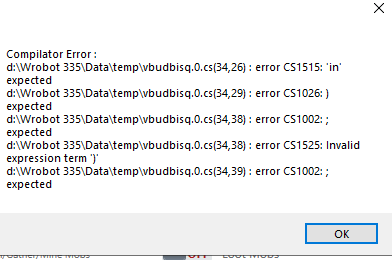 upper case
Character CLass IF Condition
in WRobot for Wow Wrath of the Lich King - Help and support
Hi
i need to put a condition on Quest Profile
to solve that
if player is Warrior ==>> wManager.wManagerSetting.CurrentSetting.RestingMana = False;
Thanks