
eeny
Elite user
-
Joined
-
Last visited
Everything posted by eeny
-
Been having this problem for AGES! finally caught a pally bot standing in front of a vendor trying to equip a green item (he should have sold) however he was stuck at the "equipping this will bind it to you". Lucky for me this was a green item and the prompt came up, for a grey / white looks like bot would have equipped... I attached the log- looks like the bot was there for a bit ~50 mins. I think the important thing here is the vendor Kaeyendis Shimmersteel - was a Horde only vendor in Talador. As an Ally i could not get a trade window up to the NPC so it looks like the bot got creative and tried to equip? While i use the profile all the time- it does not have vendors defined... so hopefully if i define some Ally vendors around the place.. and black zone around that vendor i may have chance. TL;DR - looks like it happens when you try talking to a bad/difficult vendor.. 8 Dec 2015 15H09.log.html
-
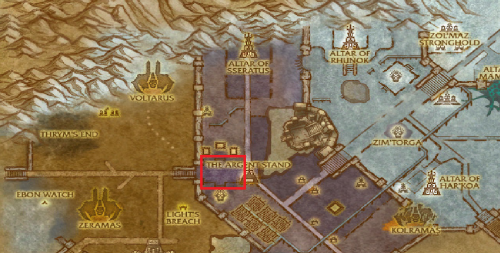 Really simple profile i use for my characters. start on the stairs west of Argent Stand and simply run around the block killing ghouls / fiends / abominations. Given enough time you can get to 73-80 with this profile. Its all next to town to selling / repairing is quick. I'm sure some smart person can modify this to add vendors and such, my bots found their own way however. Enable "attack target in fight" or you will walk past a fair bit.
 -