Sotoro
Members
-
Joined
-
Last visited
-
Thanks, work very well atm :)
-
Hey, i got a problem with my questing profile. I making dungeon farming, but I got issue. Always when my character kill 5 mobs, then loot only 1 mobs, and go for the next pack(sometimes back for first pack after killing second pack and loot it). 24 kwi 2016 19H11.log.html
-
GossipTitleButton1
-
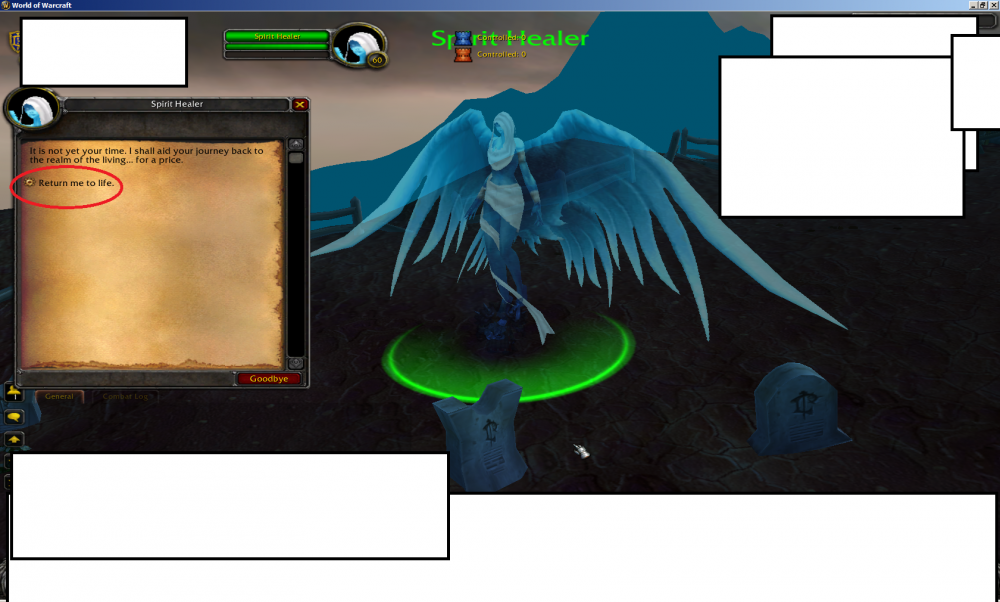
Hey, on Warmane ressurection wont work beacause here is additional button for ressurection, Any chance for add this improvment for detection this?
-
Any chance for adding this features for relogger?
-
Hey, How Can I setup(like in arelog hb) my wow instances for each one other path to Wow(I use proxy for each one wow): wow2.exe, wow3.exe etc.?
-
This work very well :) But I got 1 more issue, when bot need back to vendor then he fly near ground, how can I change this? :)
-
Ty for help! :) I try this
-
I send him my profile in PM...
-
any chance that you can fix this in next week? :)
-
Report is for 3.3.5a bot ofc.
-
Hello, my bot trying while flying ground-->air point--->ground-->air point. Ofc I set all point in air, but he still do this while :( Can you fix this? is very important for me. 29 sty 2016 18H40.log.html
-
Worked very well :)
-
The same on 4.3.4 version
-
Hello, my bot only selling items, but didnt buying(ofc I set max prices and enabled) 24 sty 2016 20H45.log.html