



Skip to content
View in the app

A better way to browse. Learn more.

WRobot

A full-screen app on your home screen with push notifications, badges and more.

To install this app on iOS and iPadOS
  1. Tap the Share icon in Safari
  2. Scroll the menu and tap Add to Home Screen.
  3. Tap Add in the top-right corner.
To install this app on Android
  1. Tap the 3-dot menu (⋮) in the top-right corner of the browser.
  2. Tap Add to Home screen or Install app.
  3. Confirm by tapping Install.

hrvatska157

WRobot user
  • Joined

  • Last visited

Everything posted by hrvatska157

  1. Hey i have the same problem. Could you fix mine too? THX @Droidz
  2. Was banned too, was using the fight class: Druid_Feral_Leveling_ScripterQQ and Wicked's Night Elf Starter 3.3.5 beta (quester) + (Wicked's) Night elf starter 6-10 (grinder). First time playing on Warmane on this PC + IP.
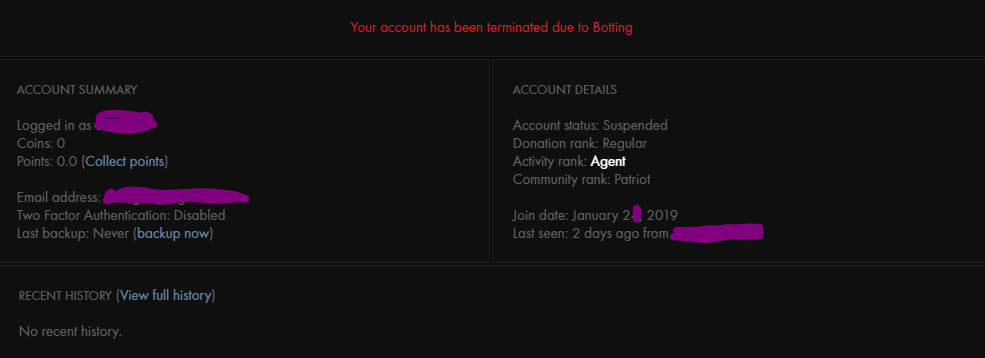
  3. Played on warmane (1st time ever), banned @lvl 8 for botting (was supervising the bot too on a 2nd monitor)...

Account

Navigation

Search

Search

Configure browser push notifications

Chrome (Android)
  1. Tap the lock icon next to the address bar.
  2. Tap Permissions → Notifications.
  3. Adjust your preference.
Chrome (Desktop)
  1. Click the padlock icon in the address bar.
  2. Select Site settings.
  3. Find Notifications and adjust your preference.