Skip to content
View in the app

A better way to browse. Learn more.

WRobot

A full-screen app on your home screen with push notifications, badges and more.

To install this app on iOS and iPadOS
  1. Tap the Share icon in Safari
  2. Scroll the menu and tap Add to Home Screen.
  3. Tap Add in the top-right corner.
To install this app on Android
  1. Tap the 3-dot menu (⋮) in the top-right corner of the browser.
  2. Tap Add to Home screen or Install app.
  3. Confirm by tapping Install.

hyazsf

Members
  • Joined

  • Last visited

  1. 任务脚本直接是不好用,
  2.    Droidz reacted to a post in a topic: wrobot界面中文粗略翻译
  3.    Droidz reacted to a post in a topic: wrobot界面中文粗略翻译
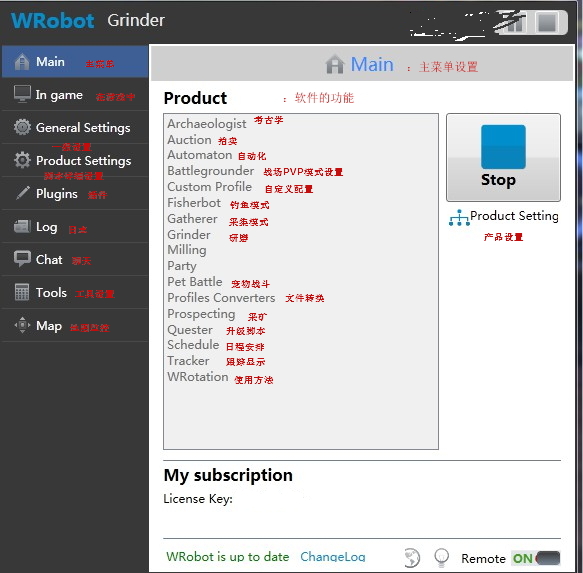
  4. in game 可以忽略,那个是监控游戏运行的数据
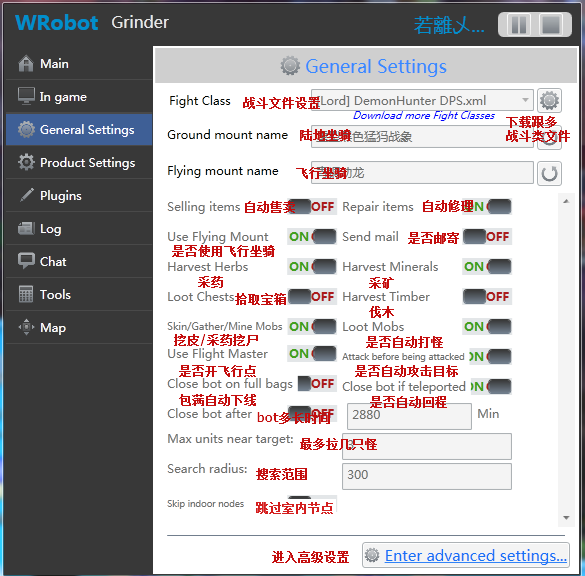
  5. 翻译的不好大家不要见笑啊!给不懂E文的朋友能快速上手,同时也为Wrobot贡献一点微小的力量吧!!!

Account

Navigation

Search

Search

Configure browser push notifications

Chrome (Android)
  1. Tap the lock icon next to the address bar.
  2. Tap Permissions → Notifications.
  3. Adjust your preference.
Chrome (Desktop)
  1. Click the padlock icon in the address bar.
  2. Select Site settings.
  3. Find Notifications and adjust your preference.