



Skip to content
View in the app

A better way to browse. Learn more.

WRobot

A full-screen app on your home screen with push notifications, badges and more.

To install this app on iOS and iPadOS
  1. Tap the Share icon in Safari
  2. Scroll the menu and tap Add to Home Screen.
  3. Tap Add in the top-right corner.
To install this app on Android
  1. Tap the 3-dot menu (⋮) in the top-right corner of the browser.
  2. Tap Add to Home screen or Install app.
  3. Confirm by tapping Install.

libi007

Members
  • Joined

  • Last visited

Everything posted by libi007

  1. Hello, so recently i noticed that Warmane got really in to banning and I got banned about 8 accounts. It got in to the point where I cant even level up my characters again because of banhammers around lvl 30-50. Do you guys have similar issues or its just me doing something wrong? Do you guys have any advices in order not to get banned so quicky?
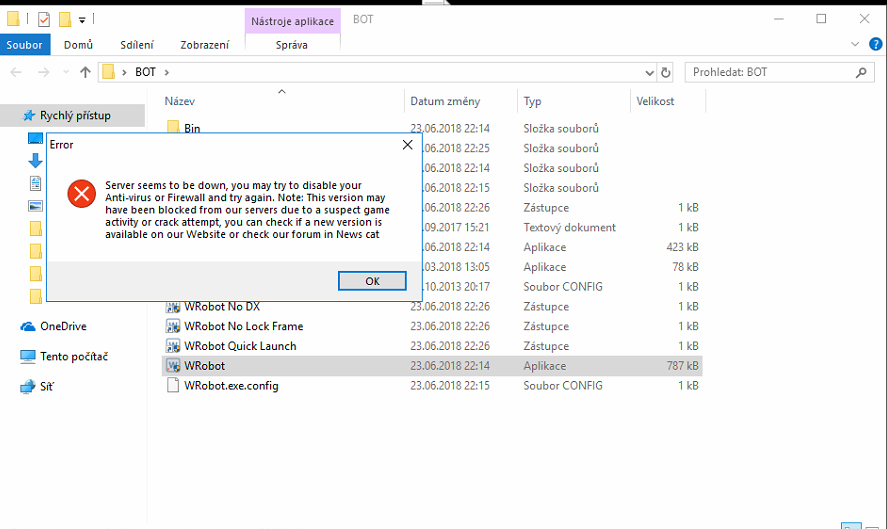
  2. Hi, I have a problem starting wrobot after fresh install any suggestions? (its not cause of FW, with another pc and IP its working just ok)
Account

Navigation

Search

Search

Configure browser push notifications

Chrome (Android)
  1. Tap the lock icon next to the address bar.
  2. Tap Permissions → Notifications.
  3. Adjust your preference.
Chrome (Desktop)
  1. Click the padlock icon in the address bar.
  2. Select Site settings.
  3. Find Notifications and adjust your preference.