kallenberg
Members
-
Joined
-
Last visited
Everything posted by kallenberg
-
-
Uh I think I found my answer... lolz.
-
Title is somehow self-explanatory. I tried to come up with a bigger profile for like 1-60.. but have not yet found a way to accomplish this. Help wold be appreciated!
-
Good profile, the area could be bigger.. tried it myself but have not been able to avoid elites in a correct way due to bot limits. Nevertheless, exalted in a ~4-6h, great.
- 8 comments
- 2 reviews
-
Most profiles are private, still. Try developing your own profile(s)..
-
No help? No comments? ^^ 7 Downloads... :/
-
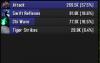
My brand new fight class does nothing.... I cannot see what I did wrong. FC attached + Skada Screenshot of a fight. Nothing but Chi Wave + Auto attacks... why is that? Priority and conditions based on Noxxic. AoE left out for now. Monk Windwalker_edit.xml
-
Too bad and thanks. Would be awesome if you could provide more things like this or auto accept popup quests AND turn in of these popup quests... would be awesome... imagine the more flexibility you provide... the easier it gets.. and again the more people may start writing awesome profiles :D
-
Hi, is there a command / function to call in order to equip a weapon or weapon+offhand? Tried to do panda start 1-12 .. failed at equipping weapons @ 3rd quest.... :(