mlau2016
Members
-
Joined
-
Last visited
Everything posted by mlau2016
-
That worked for me Zan....Thanks! I actually tried that before, but I didn't log out so the program didn't look right and I reverted it back to 4k immediately. NOTE: If you turn down your resolution, you must sign out of your computer and back in for the program to look right.
-
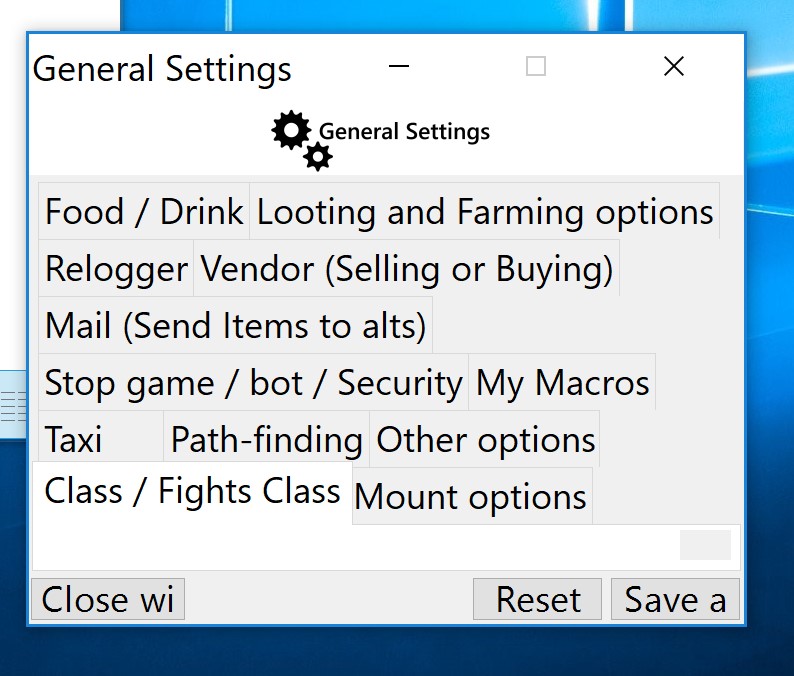
I still have not found a solution, ive tried changing all the settings on my computer. I can still use the program to a decent extent... but I cant setup specific settings to my character... or create a fighter profile.... please droidz! help! :)
-
bump
-
there we go,but I don't see how the log will help with resizing my window. I have also followed all your instructions on the troubleshoot post. 10 Dec 2017 08H08.log.html
-
did you find the solution butonek?I also have the same problem and got the same answer from Droidz but none of those have helped me so far,....
-
Hi everyone, I am having an issue when I try go to advanced settings or to create a fighter profile. The window's menu icons are all super small and I cant adjust the size of them at all. Ive attached a pic of what it looks like. Can anyone help? Literally I cannot resize this window and I cant see any of the options below.