




Pudge
WRobot user
-
Joined
-
Last visited
Everything posted by Pudge
-
⚠️⚠️⚠️ The problem is urgent. The bot breaks through the wall in cities like harry potter into the portal to hogwarts. What happens to meshes / pathfinding? And why in cities? Why can't the meshes be saved in the bot folder in case of problems with the pathfinder server ?
-
Hello, lately there are very often problems with finding a path, a bot bumping into walls in a city, or simply cannot use the path finding normally, I cannot understand the reason of this behavior: 03:17:45 - [Fight] Can't reach Scourge Banner-Bearer, blacklisting it. 03:17:45 - [Fight] Player Attack Converted Hero (lvl 80) [N] 03:17:46 - [Path-Finding] GetZPosition: 7306,558 ; 2490,304 ; 396,2049 ; "Flying" strict = False [N] 03:17:46 - [Path-Finding] GetZPosition result: Z = 0 (0 ms) [N] 03:17:46 - [Path-Finding] FindPath from 7306,558 ; 2490,304 ; 0 ; "Flying" to 7300,61 ; 2524,44 ; 395,5601 ; "None" (Northrend) [N] 03:17:46 - [Path-Finding] Cannot find path: 7306,558 ; 2490,304 ; 0 ; "Flying" (Northrend_27,33068_18,3002) to 7300,61 ; 2524,44 ; 395,5601 ; "None" (Northrend_27,26667_18,31136) [N] 03:17:46 - [Path-Finding] Path Count: 2 (397,0749y, 0ms) (resultPartial=True, resultSuccess=False (more info with server log option)) [D] 03:17:46 - [Fight] Cannot make path to the target (Converted Hero), ignore it. 03:17:46 - [Fight] Can't reach Converted Hero, blacklisting it. 03:17:47 - [Fight] Player Attack Converted Hero (lvl 80) [N] 03:17:47 - [Path-Finding] GetZPosition: 7326,559 ; 2468,781 ; 396,4211 ; "Flying" strict = False [N] 03:17:47 - [Path-Finding] GetZPosition result: Z = 0 (0 ms) [N] 03:17:47 - [Path-Finding] FindPath from 7326,559 ; 2468,781 ; 0 ; "Flying" to 7302,68 ; 2522,19 ; 395,5894 ; "None" (Northrend) [N] 03:17:47 - [Path-Finding] Cannot find path: 7326,559 ; 2468,781 ; 0 ; "Flying" (Northrend_27,37103_18,2627) to 7302,68 ; 2522,19 ; 395,5894 ; "None" (Northrend_27,27089_18,30747) [N] 03:17:47 - [Path-Finding] Path Count: 2 (399,8921y, 0ms) (resultPartial=True, resultSuccess=False (more info with server log option)) [D] 03:17:47 - [Fight] Cannot make path to the target (Converted Hero), ignore it. 03:17:47 - [Fight] Can't reach Converted Hero, blacklisting it. 03:17:47 - [Fight] Player Attack Converted Hero (lvl 79) [N] 03:17:48 - [Path-Finding] GetZPosition: 7338,118 ; 2465,958 ; 393,1622 ; "Flying" strict = False [N] 03:17:48 - [Path-Finding] GetZPosition result: Z = 0 (0 ms) [N] 03:17:48 - [Path-Finding] FindPath from 7338,118 ; 2465,958 ; 0 ; "Flying" to 7332,55 ; 2498,18 ; 391,9678 ; "None" (Northrend) [N] 03:17:48 - [Path-Finding] Cannot find path: 7338,118 ; 2465,958 ; 0 ; "Flying" (Northrend_27,37633_18,24103) to 7332,55 ; 2498,18 ; 391,9678 ; "None" (Northrend_27,31591_18,25147) [N] 03:17:48 - [Path-Finding] Path Count: 2 (393,3293y, 0ms) (resultPartial=True, resultSuccess=False (more info with server log option)) [D] 03:17:48 - [Fight] Cannot make path to the target (Converted Hero), ignore it. 03:17:48 - [Fight] Can't reach Converted Hero, blacklisting it. 03:17:48 - [Fight] Player Attack Converted Hero (lvl 79) [N] 03:17:48 - [Path-Finding] GetZPosition: 7344,723 ; 2471,328 ; 393,4188 ; "Flying" strict = False [N] 03:17:48 - [Path-Finding] GetZPosition result: Z = 0 (0 ms) [N] 03:17:48 - [Path-Finding] FindPath from 7344,723 ; 2471,328 ; 0 ; "Flying" to 7298,56 ; 2526,63 ; 395,5017 ; "None" (Northrend) [N] 03:17:48 - [Path-Finding] Cannot find path: 7344,723 ; 2471,328 ; 0 ; "Flying" (Northrend_27,36626_18,22865) to 7298,56 ; 2526,63 ; 395,5017 ; "None" (Northrend_27,26257_18,3152) [N] 03:17:48 - [Path-Finding] Path Count: 2 (402,0086y, 0ms) (resultPartial=True, resultSuccess=False (more info with server log option)) [D] 03:17:48 - [Fight] Cannot make path to the target (Converted Hero), ignore it.
-
Thank you very much, this is what I need
-
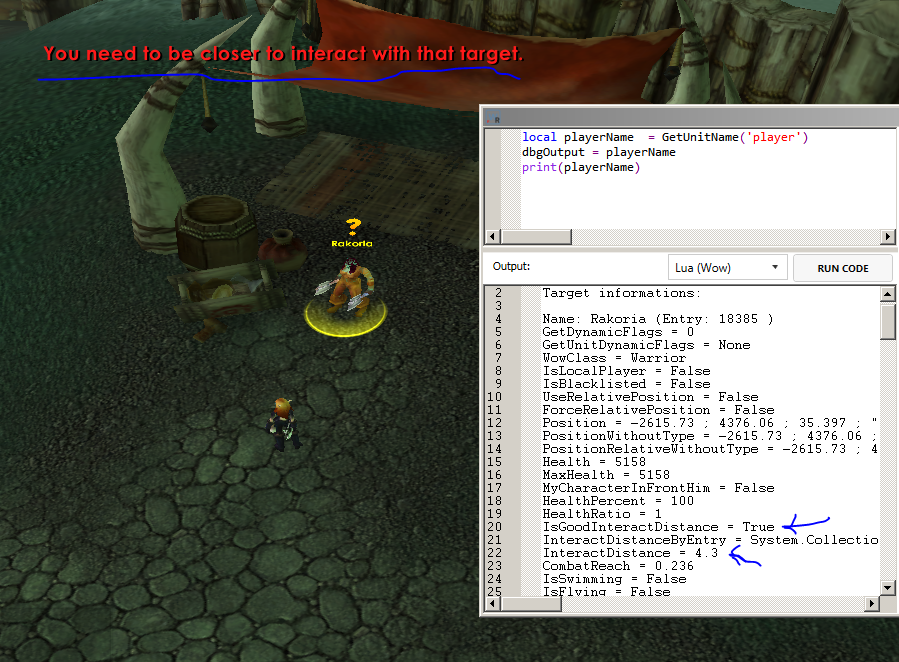
Hey, I see this a lot and I made a custom fix for this, but still cant understand. The bot stand at distance ~4.3 and tries to interact with npc, but it is unsuccessful. And these unsuccessful attempts to interact continue indefinitely until the bot is moved. So, is this the server-side-weird-bad-interaction-distance-to-npc, or wrobot?
-
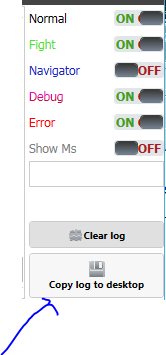
Hey all, who know how you can call this method, using code? Often there is some kind of error in the code, but by the time it is detected, the bot has already closed, and it becomes difficult to find the required log file in the "Logs" folder, when there are thousands of them, if you knew how to call this method, you could make a plugin, allowing you to copy the log when certain errors occur, this would be very useful.
-
[E] 19:09:33 - PathFinder server seem down, use offline pathfinder. Offline pathfinding does not work, a bunch of bots run into the wall in capitals. @Droidz, maybe you can do something with it, this is not the first time a problem arises when your servers crash and many of bots, after casting the hearthstone, simply run into the wall in one place, in front of everyone's eyes.
-
I think I figured out why it didn't work. p.CurrentWowAccount == null if no windows are running in the relogger. There is one more problem, the relogger for some reason does not support the russian language, instead of it there are some symbols in the form of a question mark. do so: robotManager.Helpful.Logging.Write("авбгдиичоаып"); we get: 22:03:04 - ������������
-
This is the body of the OnButtonPress() method Аfter adding robotManager.Helpful.Logging.Write("p.CurrentWowAccount==null > " + (p.CurrentWowAccount == null)); robotManager.Helpful.Logging.Write("p.CurrentWowAccount.AccountName==null > " + (p.CurrentWowAccount.AccountName == null)); robotManager.Helpful.Logging.Write("p.CurrentWowAccount.Password==null > " + (p.CurrentWowAccount.Password == null)); We get:
.jpg.2d6848098b8cf41194fa0b88b5932bc1.jpg)
-
Hi, I am trying to make a plugin for a relogger that will change account data depending on the conditions. I am facing a problem. System.Threading.Tasks.Task.Factory.StartNew(() => { for (int i = 0; i < Relogger.Classes.ReloggerGeneralSettings.CurrentSetting.Profiles.Count; i++) { try { var p = Relogger.Classes.ReloggerGeneralSettings.CurrentSetting.Profiles[i]; if (p.Checked && p.Name.ToLower().Contains("myaccountname")) { robotManager.Helpful.Logging.Write("124"); p.CurrentWowAccount.AccountName = "1242"; p.CurrentWowAccount.Password = "1242"; } } catch (Exception e) { robotManager.Helpful.Logging.WriteError(Name + " > " + e); } } }); When trying to read or change the field CurrentWowAccount.AccountName or CurrentWowAccount.Password I get the error: [E] 22:26:06 - CHANGEKEY > System.NullReferenceException: Ссылка на объект не указывает на экземпляр объекта. в MyNamespace.MyPlugin.b__0() Is it possible to implement changing account data through a plugin or is this error a consequence of data protection?
-
Hi, lately I can't use the robot normally, because every other time when starting the bot, the next error appears. The reason for the error is not clear to me. 16 сен 2021 04H43 - aVwltF.log.html
-
Hello. I don't need backups of xml files. Wrobot literally spam these files in the settings folder until the free disk space runs out, and I have very little free space. How to disable it?
-
@Droidz, you have something trouble with the PathFinder servers.Log writes that the server is down, and does not change to another, instead, writes next: "[E] 09:48:29 - PathFinder server seem down, use offline pathfinder." - and runs into the wall.
-
Hello everybody, i need some help with my code.... I use this method to load quest profile from plugin or in Runcode: public static void LoadProfile(string file) { System.Threading.Tasks.Task.Factory.StartNew(() => { Logging.Write("[QuestHelper]: loading profile " + file); Quester.Bot.QuesterSetting.CurrentSetting.ProfileName = file; Quester.Bot.QuesterSetting.CurrentSetting.Save(); Thread.Sleep(2000); robotManager.Products.Products.ProductRestart(); }); } But i always get next error after executing code: [D] 21:45:05 - [FSM] State wManager.Wow.Bot.States.Idle already launched, ignore it. [D] 21:45:05 - [FSM] State already launched, ignore it. [D] 21:45:05 - [FSM] State wManager.Wow.Bot.States.Trainers already launched, ignore it. [D] 21:45:05 - [FSM] State wManager.Wow.Bot.States.Talents already launched, ignore it. [D] 21:45:05 - [FSM] State wManager.Wow.Bot.States.FlightMasterDiscoverState already launched, ignore it. [D] 21:45:05 - [FSM] State wManager.Wow.Bot.States.ToTown already launched, ignore it. [D] 21:45:05 - [FSM] State wManager.Wow.Bot.States.FlightMasterTakeTaxiState already launched, ignore it. [D] 21:45:05 - [FSM] State wManager.Wow.Bot.States.ProspectingState already launched, ignore it. [D] 21:45:05 - [FSM] State wManager.Wow.Bot.States.MillingState already launched, ignore it. [D] 21:45:05 - [FSM] State wManager.Wow.Bot.States.Farming already launched, ignore it. [D] 21:45:05 - [FSM] State wManager.Wow.Bot.States.Looting already launched, ignore it. [D] 21:45:05 - [FSM] State wManager.Wow.Bot.States.Regeneration already launched, ignore it. [D] 21:45:05 - [FSM] State wManager.Wow.Bot.States.FarmingRange already launched, ignore it. [D] 21:45:05 - [FSM] State wManager.Wow.Bot.States.LootingRange already launched, ignore it. [D] 21:45:05 - [FSM] State wManager.Wow.Bot.States.BattlePetState already launched, ignore it. [D] 21:45:05 - [FSM] State wManager.Wow.Bot.States.IsAttacked already launched, ignore it. [D] 21:45:05 - [FSM] State wManager.Wow.Bot.States.MyMacro already launched, ignore it. [D] 21:45:05 - [FSM] State wManager.Wow.Bot.States.Resurrect already launched, ignore it. [D] 21:45:05 - [FSM] State wManager.Wow.Bot.States.Pause already launched, ignore it. [D] 21:45:05 - [FSM] State wManager.Wow.Bot.States.Relogger already launched, ignore it. Аfter these lines in the log, the bot stops working and just stay. I cant understand what is wrong with this code and how to make it work as it should, I will be glad of any help.
-
Healing spell used as food is used on the target if it is valid instead of the playerfor (int i = 0; i < Relogger.Classes.ReloggerGeneralSettings.CurrentSetting.Profiles.Count; i++) { var p = Relogger.Classes.ReloggerGeneralSettings.CurrentSetting.Profiles[i]; if (p.Status == Relogger.Classes.Status.Running) { if (p.CurrentWowAccount.Server == "server name") { if (p.ExistWowProcess()) { p.KillWowProcess(); robotManager.Helpful.Logging.Write(Name + ": Kill wow for " + p.Name); } if (p.ExistWRobotProcess()) { p.ExistWRobotProcess(); robotManager.Helpful.Logging.Write(Name + ": Kill Bot for " + p.Name); } p.Stop(); Thread.Sleep(Others.Random(5000, 10000)); } } } It works, thanks.I changed to p.CurrentWowAccount.Server == "myserver" and got an error:
 Hi, I have a need to stop all bots on separate servers, how can I do this using the reloger plugin? I wrote a small plugin using robotManager.Helpful; using System; using System.Threading; using System.Windows.Forms; namespace Killer { public class MyPlugin : Relogger.ReloggerPlugin { public override string Name { get { return "Killer"; } } bool IsRunning { get; set; } public override void OnStart() { } public override void OnStop() { IsRunning = false; } public override void OnButtonPress() { System.Threading.Tasks.Task.Factory.StartNew(() => { Logging.WriteDebug("Kill all tasks started"); for (int i = 15; i > 0; i--) { Logging.WriteDebug(i + " seconds until start end"); Thread.Sleep(1000); } try { for (int i = 0; i < Relogger.Classes.ReloggerGeneralSettings.CurrentSetting.Profiles.Count; i++) { var p = Relogger.Classes.ReloggerGeneralSettings.CurrentSetting.Profiles[i]; if (p.Status == Relogger.Classes.Status.Running) { if (p.ExistWowProcess()) { p.KillWowProcess(); robotManager.Helpful.Logging.Write(Name + ": Kill wow for " + p.Name); } if (p.ExistWRobotProcess()) { p.ExistWRobotProcess(); robotManager.Helpful.Logging.Write(Name + ": Kill Bot for " + p.Name); } p.Stop(); Thread.Sleep(Others.Random(5000, 10000)); } } } catch (Exception e) { robotManager.Helpful.Logging.WriteError(Name + " > " + e); } }); //System.Threading.Thread.Sleep(500); base.OnButtonPress(); } } } that turns off all running bots. Is it possible to implement this through the ReloggerPlugin or some other way? @Droidz would not want to add the ability to use multiple RelogerGeneralSettings.xml instead of copying the bot folder.But I would like to be able to stop bots on specific servers without stopping everyone.Hello. I have this bug very often. Bot just stucks at one fly point near which there are no obstacles. If necessary I can send log and video in pm. [N] 01:16:13 - [MovementManager] Long Move distance: 4.988173 [N] 01:16:15 - [MovementManager] Long Move distance: 4.821046 [N] 01:16:18 - [MovementManager] Long Move distance: 4.49853 [N] 01:16:20 - [MovementManager] Long Move distance: 5.361514 [N] 01:16:22 - [MovementManager] Long Move distance: 6.72049 [N] 01:16:25 - [MovementManager] Long Move distance: 6.314182 [N] 01:16:28 - [MovementManager] Long Move distance: 6.802619 [N] 01:16:31 - [MovementManager] Long Move distance: 10.39222 [N] 01:16:33 - [MovementManager] Long Move distance: 7.15834 [N] 01:19:56 - [MovementManager] Long Move distance: 108.7237 [N] 01:20:02 - [MovementManager] Long Move distance: 6.71558 [N] 01:20:05 - [MovementManager] Long Move distance: 4.723788 [N] 01:20:07 - [MovementManager] Long Move distance: 6.703122 [N] 01:20:10 - [MovementManager] Long Move distance: 4.405176 [N] 01:20:13 - [MovementManager] Long Move distance: 4.716866 [N] 01:20:15 - [MovementManager] Long Move distance: 4.538973 [N] 01:20:18 - [MovementManager] Long Move distance: 6.65615 [N] 01:20:20 - [MovementManager] Long Move distance: 4.588148 [N] 01:20:23 - [MovementManager] Long Move distance: 6.524607 [N] 01:20:26 - [MovementManager] Long Move distance: 4.619357 [N] 01:20:28 - [MovementManager] Long Move distance: 6.616521 [N] 01:20:31 - [MovementManager] Long Move distance: 4.693025 [N] 01:20:34 - [MovementManager] Long Move distance: 6.520239 [N] 01:20:37 - [MovementManager] Long Move distance: 4.439559 [N] 01:20:40 - [MovementManager] Long Move distance: 6.551129 [N] 01:20:43 - [MovementManager] Long Move distance: 4.718534 [N] 01:20:45 - [MovementManager] Long Move distance: 6.492306 [N] 01:20:48 - [MovementManager] Long Move distance: 4.485656 [N] 01:20:51 - [MovementManager] Long Move distance: 4.608229How can I find error like this? When I have about 1000+ steps in profile? [E] 11:13:17 - Compilator Error (steps cache) : q:\WRobot\Data\temp\l1r0zg2v.0.cs(3488,2) : error CS1026: ) expectedVar.GetVar("RND5451") == 2 How could I have missed it! Thank you so much!...@Droidz I have no idea how to fix this, I'm trying to find error in the one profile for about 2 hours but still got them ........ please helpHow can I find a problematic 'step' if I have hundreds and thousands of them in the one profile? Now I have a major headache because of this errors... [E] 15:00:57 - Compilator Error (steps cache) : q:\WRobot_gatherer1\Data\temp\agsvn3p3.0.cs(1111,12) : error CS0411: The type arguments for method 'robotManager.Helpful.Var.GetVar(string)' cannot be inferred from the usage. Try specifying the type arguments explicitly. q:\WRobot_gatherer1\Data\temp\agsvn3p3.0.cs(1115,12) : error CS0411: The type arguments for method 'robotManager.Helpful.Var.GetVar(string)' cannot be inferred from the usage. Try specifying the type arguments explicitly.Hi everyone, I have a question, how better to change the fight class... When I use the next code if(ObjectManager.Me.WowClass == WoWClass.Paladin) { wManager.wManagerSetting.CurrentSetting.CustomClass = "ret_pal.cs"; } CustomClass.DisposeCustomClass(); Thread.Sleep(2000); CustomClass.LoadCustomClass(); Sometimes the fiteclass for some reason does not load, can someone tell me another way without bugs? And I would also like to understand what the CustomClass.ResetCustomClass() method does?Thanks a lot. But now before loading steps the error appears (doesn't seem to affect the work of the bot): [E] 14:23:18 - Compilator Error (steps cache) : q:\WRobot_gatherer1\Data\temp\3dkmob2h.0.cs(778,51) : error CS1002: ; expected q:\WRobot_gatherer1\Data\temp\3dkmob2h.0.cs(3407,2) : error CS1026: ) expected

