




Pudge
WRobot user
-
Joined
-
Last visited
Everything posted by Pudge
-
Since the latest updates, checkboxes (✓) have become invisible until the field in the relogger is running. Please fix that. This is only on windows classic theme. For clarity, I am attaching a video.
-
A few days ago before reading this thread, I added this: wManager.Wow.Bot.Tasks.GoToTask.ToPositionAndIntecractWithGameObject(new Vector3(-1880.28, 5357.53, -12.4281), 183321); MovementManager.StopMove(); Thread.Sleep(new System.Random().Next(1000, 3000)); robotManager.Products.Products.InPause = true; Thread.Sleep(new System.Random().Next(1000, 3000)); robotManager.Products.Products.InPause = false; return true; But it seems this shit still appears again with a little chance. Thanks for replies! I will try your ways guys.
-
// off before quest wManager.wManagerSetting.CurrentSetting.MyMacro1.Actif = false; wManager.wManagerSetting.CurrentSetting.MyMacro2.Actif = false; wManager.wManagerSetting.CurrentSetting.MyMacro3.Actif = false; //4 5 6 etc //on after quest wManager.wManagerSetting.CurrentSetting.MyMacro1.Actif = true; wManager.wManagerSetting.CurrentSetting.MyMacro2.Actif = true; wManager.wManagerSetting.CurrentSetting.MyMacro3.Actif = true; //4 5 6 etc Use Runcode before and after quest, where u need off macros. Shoud work
-
I am already using code similar to yours, but this is a workaround, it just worked fine in older versions, and I noticed that the bot owes a debt to the vendor, when before the purchase took a couple of seconds. Thanks for the answer.
-
Hey, do you read what I wrote? And what, bug will be fixed this way? Man, I've restated bot above 100500 times, and now I'm totally bored of this, that's really annoying, ugh.
-
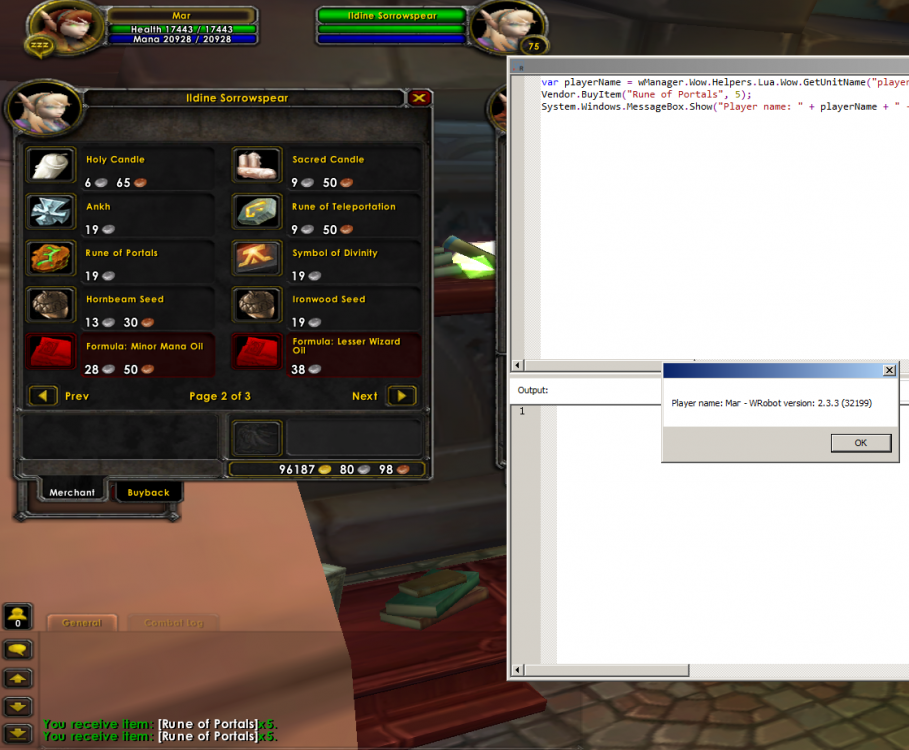
Hi. The function Vendor.BuyItem(); does not work correctly.Instead of the required amount,just one good is always bought.
-
This appears after stopping bot using stop button and launch bot again, after this messages bot doesnt do anything until kill the process and start the bot again. It happens very often. I made the function in my plugin that kill wrobot.exe after this messages appears in log, but the plugin is usually loaded after these entries appears in log and in 99% of cases this does not work. [D] 12:12:33 - [FSM] State wManager.Wow.Bot.States.Idle already launched, ignore it.[D] 12:12:33 - [FSM] State already launched, ignore it.[D] 12:12:33 - [FSM] State wManager.Wow.Bot.States.Trainers already launched, ignore it.[D] 12:12:33 - [FSM] State wManager.Wow.Bot.States.Talents already launched, ignore it.[D] 12:12:33 - [FSM] State wManager.Wow.Bot.States.FlightMasterDiscoverState already launched, ignore it.[D] 12:12:33 - [FSM] State wManager.Wow.Bot.States.ToTown already launched, ignore it.[D] 12:12:33 - [FSM] State wManager.Wow.Bot.States.FlightMasterTakeTaxiState already launched, ignore it.[D] 12:12:33 - [FSM] State wManager.Wow.Bot.States.ProspectingState already launched, ignore it.[D] 12:12:33 - [FSM] State wManager.Wow.Bot.States.MillingState already launched, ignore it.[D] 12:12:33 - [FSM] State wManager.Wow.Bot.States.Farming already launched, ignore it.[D] 12:12:33 - [FSM] State wManager.Wow.Bot.States.Looting already launched, ignore it.[D] 12:12:33 - [FSM] State wManager.Wow.Bot.States.Regeneration already launched, ignore it.[D] 12:12:33 - [FSM] State wManager.Wow.Bot.States.FarmingRange already launched, ignore it.[D] 12:12:33 - [FSM] State wManager.Wow.Bot.States.LootingRange already launched, ignore it.[D] 12:12:33 - [FSM] State wManager.Wow.Bot.States.BattlePetState already launched, ignore it.[D] 12:12:33 - [FSM] State wManager.Wow.Bot.States.IsAttacked already launched, ignore it.[D] 12:12:33 - [FSM] State wManager.Wow.Bot.States.MyMacro already launched, ignore it.[D] 12:12:33 - [FSM] State wManager.Wow.Bot.States.Resurrect already launched, ignore it.[D] 12:12:33 - [FSM] State wManager.Wow.Bot.States.Pause already launched, ignore it.[D] 12:12:33 - [FSM] State wManager.Wow.Bot.States.Relogger already launched, ignore it.
-
I don't know if this can be called a bug, but before, when the bot died near the spirit healer, and the corpse was in the 40 yards (resurrection zone), the bot didn't use the healer and resurrected at the corpse. Now, even when the corpse lies within reach, the bot uses the healer, ignoring the availability of the corpse. It would be nice to do as it was before. After the latest updates:
-
this is the one, thank you again
-
Is it possible to perform such actions with a bot? cant find method how get WindowHandle value for wrobot application, if it works
-
wManager.Wow.Helpers.SpellManager.UpdateSpellBook(); if(wManager.Wow.Helpers.SpellManager.ExistSpellBook("White Kodo")) { Logging.Write("Exist"); wManager.wManagerSetting.CurrentSetting.GroundMountName = "White Kodo"; } or use lua check if (Lua.LuaDoString<bool>(@"for i=1,GetNumCompanions('MOUNT') do _,creatureName = GetCompanionInfo('MOUNT', i) if creatureName == 'White Kodo' then return true end end")) { Logging.Write("Exist"); wManager.wManagerSetting.CurrentSetting.GroundMountName = "White Kodo"; } both should work
-
try wManager.Wow.Helpers.SpellManager.ExistSpellBook("mount name");
-
Hello! I don't quite understand if it's a bug or not ... Sometimes when a bot makes a quest with a click on an object, for example, a portal click from city 1 to city 2, it sometimes ignores the "Is complete condition" and continues to run somewhere further. For example: Quest: PortalFromDalaranToExodar. The code for this quest (only 1 line): wManager.Wow.Bot.Tasks.GoToTask.ToPositionAndIntecractWithGameObject(new Vector3(5699.33, 735.217, 641.767), 191007); return true; Is complete condition for this quest: return !ObjectManager.Me.IsAlliance || Usefuls.MapZoneName == "The Exodar"; "Not required in quest log" set to true. But, as soon as bot crosses the portal and finds himself in the Exodar - he continues to run along some coordinate! It seems this is the coordinate of Dalaran portal to Exodar, but at this moment the bot is "blind" and does not see that it is already in the Exodar! I tried adding Thread.Sleep after the interact with portal code, but the bot still sometimes ignores Is complete condition ... How can I fix this? Thanks for the answers, if someone understood me and knows what can be done.
-
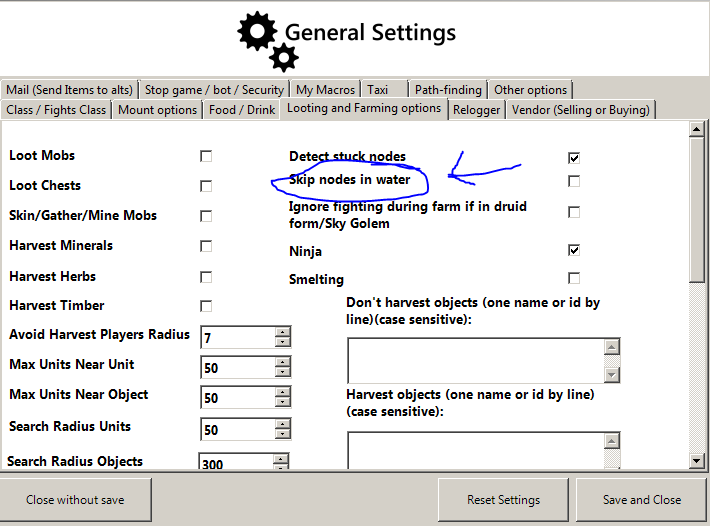
Man....... this option aready exists but it seems it doesnt work.
-
Hi! Is this option not working at all? Or is this a individual case?
-
Good. But what if I want to check that the enemy player is hitting me, but is not targeting me? Only using lua events? It's a headache ...
-
Hi! It seems this boolean doesn't return true if the enemy is attacking me but isn't targeting me (using aoe ability for example), or when the enemy is in combat with other npc/player but targeting me. In short: it returns true when enemy is in any kind of combat and targeting me, this is not entirely correct conditions for "is in combat with me".
-
Hello! Please tell me the noob what is the difference between IsValid and != null. I've noticed that IsValid doesn't works correctly in some cases when I add check for objects/npcs/players, for example like this: var ganker = ObjectManager.GetObjectWoWPlayer().FirstOrDefault(g => g.IsAttackable && g.GetDistance < 150 && !g.IsDead); Thanks in advance for answers!
-
Hi! I tried to add offmesh here, and it seemed like it even worked out, but in 50% of cases the bot runs back and forth through the portal, maybe because the bot does not have time to process it? I think there needs to be some kind of delay after he crosses the portal / approaches the desired position.
-
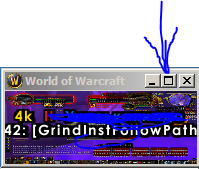
Many many thanks!!!@Droidz Sorry for the insolence, I would like to ask for help with a boolean to check when the window is minimized / maximized :)Parfait, Mr. Droidz! What would I do without you?!!! Number 4 for minimize :)Hey! How can I do this by c#? Without chanching resolution. Does the wrobot api has kind of this? Or need the big code? :) Just for use this button
 Pudge replied to blackrockspeculator's topic in WRobot for Wow The Burning Crusade - Help and supportWrobot is actually good. Lazy, arrogant and greedy people are bad.

