




Ladrek69
Members
-
Joined
-
Last visited
Everything posted by Ladrek69
-
should be an option for go to step
-
if a profile step has been completed how'd i get the bot to ignore that step and move on to the next steps without having to manually do it.
-
Last one, this keeps happening when i try to dismiss pet (WoW 3.3.5)

-
Thank you and where can i find info like this?
-
I would like for my profile to have Radar3D atomically turned on and blacklist where died last.
-
how'd you do UI like andoido profile?
-
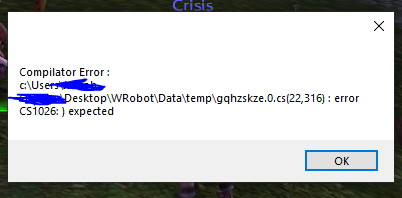
error message i'm getting
-
any fix for this :(?
-
only happens when npc has 2 quests in the menu
-
it doesn't really have any errors in the logs for it... and it just keeps re-opening it
-
Done 🙂 10 Dec 2021 17H09.log.html
-
its in the plugin folder
-
running the above plugin didn't work 😞
-
i have quester selected i dont have grinder selected
-
getting this error message when trying to use it, its in the plugin folder. [E] 13:04:39.465 - dfsg gfds gfds#2: The operation has timed out [E] 13:04:39.465 - fzegfzefezsfdsfsdfsdfdsfsdBytes [E] 13:04:39.496 - Quester.Bot > Pulse(): System.NullReferenceException: Object reference not set to an instance of an object. at Quester.Bot.Bot.Pulse(Boolean loadSettingsProfile, String profile)
-
whered where'd i put this?