




lucksfx
Members
-
Joined
-
Last visited
-
-
-
-
-
-
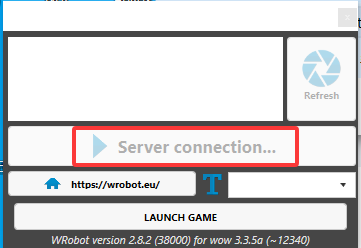
There was an update prompt today. After updating, the software crashes when it shows "Connecting to the server". It worked fine before the update. edit: After testing, switching to another version via the Updater and updating over it works fine. However, when switching back to the WOLK version and updating again, it crashes. Please investigate the cause.
-
假死等待几秒后再站起来
-
-
Hey devs, I've been working on some custom FightClass profiles and ran into something that's been driving me crazy for the past few hours. Not sure if this is intentional or an actual bug. The problem: The API uses "ContionType" instead of "ConditionType" - notice the missing 'i'. Same thing with the enum "FightClassContionsType". I was writing XML files and naturally typed this (DOESN'T WORK): <FightClassCondition> <ConditionType>HealthPercent</ConditionType> <Param xsi:type="FightClassConditionNumber"> <Type>Smaller</Type> <Value>50</Value> </Param> </FightClassCondition> Spent forever debugging why my conditions weren't working. Finally checked the actual API docs and saw it's spelled ContionType. Changed to this and it works: <FightClassCondition> <ContionType>HealthPercent</ContionType> <Param xsi:type="FightClassConditionNumber"> <Type>Smaller</Type> <Value>50</Value> </Param> </FightClassCondition> My question is: Is this a typo that made it into production, or was there a reason for spelling it this way? It's in both the CHM file and the HTML docs, so it's definitely in the compiled DLL. Here's what the API shows: public class FightClassCondition { public FightClassContionsType ContionType { get; set; } public FightClassConditionBase Param { get; set; } } If it's a bug: Any chance of fixing this in a future version? I know it would break existing profiles, but maybe you could support both spellings during a transition period? If it's intentional: Could you add a note somewhere in the docs? Would've saved me a lot of time. Just want to make sure I'm not missing something obvious here. Thanks!
-
When using Easy Quests Editor, in the 'Is Complete' condition, how should I write the command to return when I am teleported?
-
-
-
Sry my english.I found a bug while debugging the Druid's Lacerate skill. In the "Add condition" section, the "Buff Time Left Target" option is not working properly. The "Bigger/Smaller" comparisons are ineffective, making it impossible to correctly assess the remaining time of the debuff on the target. I am using WR2.8.0, and the game version is 3.3.5. Currently, my workaround is to write my own Lua script to check the stack count and remaining time, as follows: -- 函数:检查目标的 Debuff 并获取其剩余时间和层数 local function CheckDebuff(target, debuffId) for i = 1, 40 do local name, _, count, _, _, duration, expirationTime, _, _, _, spellId = UnitDebuff(target, i) if spellId == debuffId then local remainingTime = expirationTime - GetTime() return remainingTime, count end end return nil, nil end -- 常量:Lacerate 的 Debuff ID local LACERATE_DEBUFF_ID = 48568 -- 检查目标的 Lacerate Debuff 剩余时间和层数 local remainingTime, stackCount = CheckDebuff("target", LACERATE_DEBUFF_ID) -- 如果剩余时间小于 10 秒或层数小于 3 层,则释放 Lacerate if (remainingTime and remainingTime < 10) or (stackCount and stackCount < 3) then -- 使用 CastSpellByName 函数释放 Lacerate -- 注意:这种自动施法的行为可能违反游戏规则 CastSpellByName("割伤") end

