




Skip to content
View in the app

A better way to browse. Learn more.

WRobot

A full-screen app on your home screen with push notifications, badges and more.

To install this app on iOS and iPadOS
  1. Tap the Share icon in Safari
  2. Scroll the menu and tap Add to Home Screen.
  3. Tap Add in the top-right corner.
To install this app on Android
  1. Tap the 3-dot menu (⋮) in the top-right corner of the browser.
  2. Tap Add to Home screen or Install app.
  3. Confirm by tapping Install.

WRobot beta (need testers) and WRobot schedule

Hello,

About beta:

I have changed" memory read" library (I have written it in c++, more fast), to avoid problems I need a testers before release this update.

If you can tell me if you get problems (or not) with this version (don't forget "log" file if you have problems).

You can download beta version here: http://download.wrobot.eu/wrobot/wrobotbeta.zip

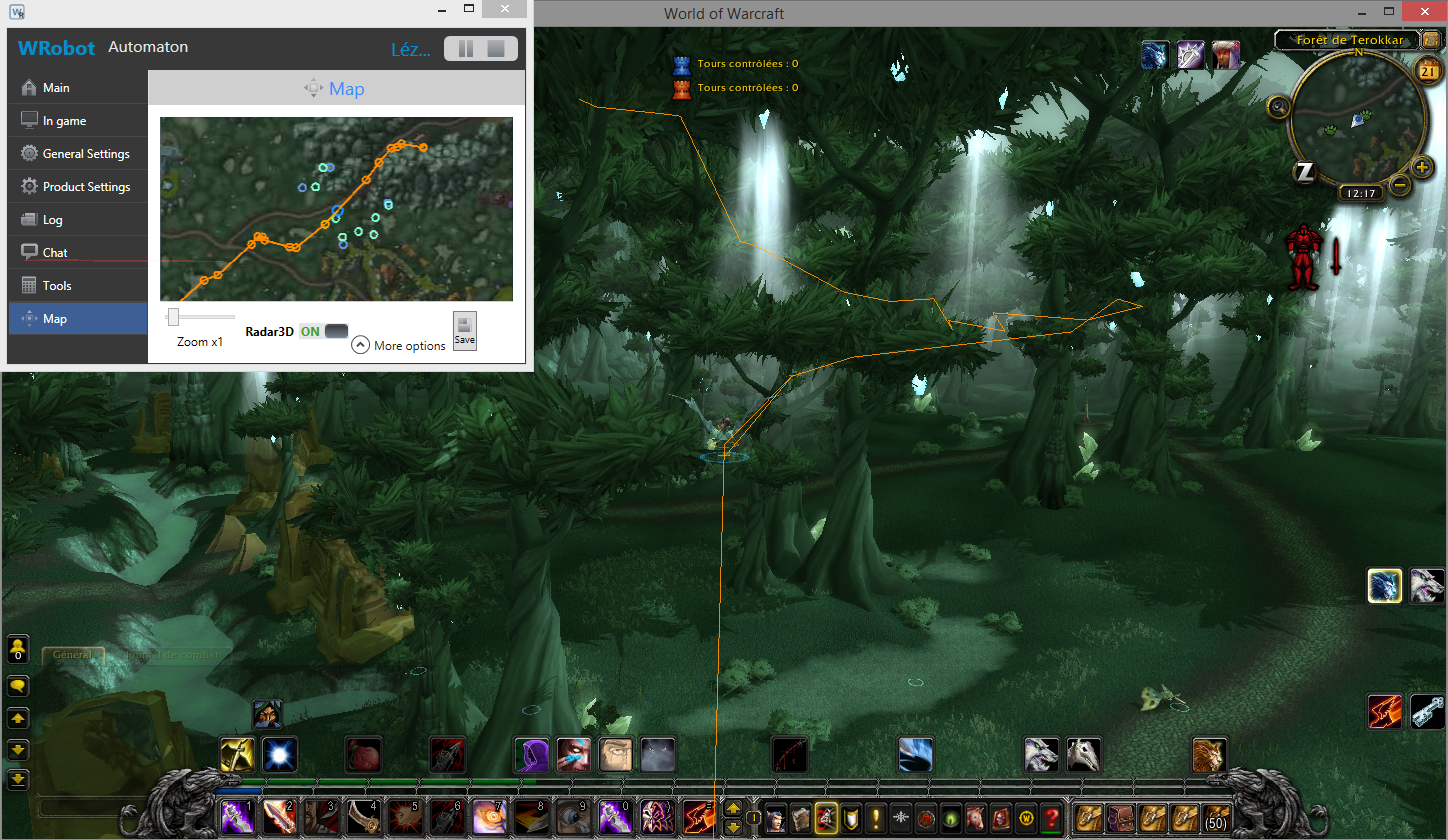
Edit August 21: I have added 3D radar (tab "Map"), it is ingame radar, I need review:
e09c7f131bc1a49cc35e4b1b53e31957.png

About schedule:

I work currently on your suggestions/bugs proposed on the forum or on the bug tracker. I'll try to finish all before WoD (to start WoD adventure on good bases).

I'll start to work on WoD when PTR WoD server will been open (and I'll release quickly WRobot beta version for WoD to allow you/me time to fix problems and start to work on profiles/fightclass before WoD beta end).

Best regards, Droidz.

User Feedback

Recommended Comments

Seumas

Elite user

When I launch the bot it says there is an update I click yes for update nothing happens? When I click no it doesn't see my WoW client running.


CoqFDX.log

[D] 22:26:40 - Log file created: 17 Aug 2014 22H26 - CoqFDX.log.html
[D] 22:26:40 - WRobot Version: 1.2.3 for wow: 5.4.8_18414
[D] 22:26:40 - Offical website: http://wrobot.eu/
[D] 22:26:40 - Operating System Details: Microsoft Windows NT 6.2.9200.0
[D] 22:26:40 - Lang: English (United Kingdom)
[E] 22:26:40 - RefreshProcessList(): System.IO.FileNotFoundException: Could not load file or assembly 'MemoryRobot.dll' or one of its dependencies. The specified module could not be found.
File name: 'MemoryRobot.dll'
at wManager.Wow.Memory.IsGoodVersion(Int32 processId)
at WRobot.LoginWindow.mJuIsmPl7C()

LAyrm.log

[D] 22:26:59 - Log file created: 17 Aug 2014 22H26 - LAyrm.log.html
[D] 22:26:59 - WRobot Version: 1.2.3 for wow: 5.4.8_18414
[D] 22:26:59 - Offical website: http://wrobot.eu/
[D] 22:26:59 - Operating System Details: Microsoft Windows NT 6.2.9200.0
[D] 22:26:59 - Lang: English (United Kingdom)
[E] 22:26:59 - RefreshProcessList(): System.IO.FileNotFoundException: Could not load file or assembly 'MemoryRobot.dll' or one of its dependencies. The specified module could not be found.
File name: 'MemoryRobot.dll'
at wManager.Wow.Memory.IsGoodVersion(Int32 processId)
at WRobot.LoginWindow.mJuIsmPl7C()


[E] 22:27:03 - RefreshProcessList(): System.IO.FileNotFoundException: Could not load file or assembly 'MemoryRobot.dll' or one of its dependencies. The specified module could not be found.
File name: 'MemoryRobot.dll'
at wManager.Wow.Memory.IsGoodVersion(Int32 processId)
at WRobot.LoginWindow.mJuIsmPl7C()


[E] 22:27:17 - ReadFile(string filePath, bool writeNewLine = false): System.IO.IOException: The process cannot access the file 'C:\Users\Louie\Desktop\WRobot beta\Settings\wowPath.txt' because it is being used by another process.
at System.IO.__Error.WinIOError(Int32 errorCode, String maybeFullPath)
at System.IO.FileStream.Init(String path, FileMode mode, FileAccess access, Int32 rights, Boolean useRights, FileShare share, Int32 bufferSize, FileOptions options, SECURITY_ATTRIBUTES secAttrs, String msgPath, Boolean bFromProxy, Boolean useLongPath, Boolean checkHost)
at System.IO.FileStream..ctor(String path, FileMode mode, FileAccess access, FileShare share, Int32 bufferSize, FileOptions options, String msgPath, Boolean bFromProxy, Boolean useLongPath, Boolean checkHost)
at System.IO.StreamReader..ctor(String path, Encoding encoding, Boolean detectEncodingFromByteOrderMarks, Int32 bufferSize, Boolean checkHost)
at System.IO.StreamReader..ctor(String path)
at robotManager.Helpful.Others.ReadFile(String filePath, Boolean writeNewLine)

[E] 22:27:23 - RefreshProcessList(): System.IO.FileNotFoundException: Could not load file or assembly 'MemoryRobot.dll' or one of its dependencies. The specified module could not be found.
File name: 'MemoryRobot.dll'
at wManager.Wow.Memory.IsGoodVersion(Int32 processId)
at WRobot.LoginWindow.mJuIsmPl7C()


[E] 22:27:24 - ResetConfigWowThread(): System.TypeInitializationException: The type initializer for 'wManager.Wow.Memory' threw an exception. ---> System.IO.FileNotFoundException: Could not load file or assembly 'MemoryRobot.dll' or one of its dependencies. The specified module could not be found.
at robotManager.MemoryClass.Hook..ctor(Int32 processId, UInt32 detourAddress, Byte[] originalBytes)
at wManager.Wow.Memory..cctor()
--- End of inner exception stack trace ---
at wManager.Wow.Helpers.ConfigWowForThisBot.QxojWY9TqO()

Log

[D] 22:26:13 - Log file created: 17 Aug 2014 22H26.log.html
[D] 22:26:13 - WRobot Version: 1.2.3 for wow: 5.4.8_18414
[D] 22:26:13 - Offical website: http://wrobot.eu/
[D] 22:26:13 - Operating System Details: Microsoft Windows NT 6.2.9200.0
[D] 22:26:13 - Lang: English (United Kingdom)
[E] 22:26:14 - RefreshProcessList(): System.IO.FileNotFoundException: Could not load file or assembly 'MemoryRobot.dll' or one of its dependencies. The specified module could not be found.
File name: 'MemoryRobot.dll'
at wManager.Wow.Memory.IsGoodVersion(Int32 processId)
at WRobot.LoginWindow.mJuIsmPl7C()


Hello,  Thanks for report. Can you say me if you have file "MemoryRobot.dll" in folder "WRobot\Bin\"?


It is normal for update request.

Seumas

Elite user

Yes I have MemoryRobot.dll 

Can you donwload and try again please. I have try to fix problem.


Thanks

Seumas

Elite user

New version is working but it still requests that I update the bot but when I click yes nothing happens. If I click no the bot will load as normal.

Ok thanks, it is normal for update request (WRobot try to update to normal version, but I have removed update application to don't update).
 
I have added in game radar (you can activate this option in tab "Map"), you need to download again WRobot beta.

YogiigoY

Members

Hey been using the trial version for awhile and possibly going to buy the full version im just broke as all hell... anyway love the bot and was wondering if there was a way to use profiles in .lua format since they seem to run smoother than .xml ... i do allot of scripting currently for BoL and if you ever need someone to test and send bug reports or anything like that let me know :) thnx again for a great bot.

Hello,
 
No sorry, you cannot use lua profile (you can convert it manually if you have know base in xml/lua).
 
And new update, you need to download again beta.

Create an account or sign in to comment

Account

Navigation

Search

Search

Configure browser push notifications

Chrome (Android)
  1. Tap the lock icon next to the address bar.
  2. Tap Permissions → Notifications.
  3. Adjust your preference.
Chrome (Desktop)
  1. Click the padlock icon in the address bar.
  2. Select Site settings.
  3. Find Notifications and adjust your preference.