



Skip to content
View in the app

A better way to browse. Learn more.

WRobot

A full-screen app on your home screen with push notifications, badges and more.

To install this app on iOS and iPadOS
  1. Tap the Share icon in Safari
  2. Scroll the menu and tap Add to Home Screen.
  3. Tap Add in the top-right corner.
To install this app on Android
  1. Tap the 3-dot menu (⋮) in the top-right corner of the browser.
  2. Tap Add to Home screen or Install app.
  3. Confirm by tapping Install.

Legion Bot wrong version ?

  • Product: WRobot General
  • Type: Bug
  • Status: Unconfirmed

Hi @all,

i´ve started the Legion Bot, 1st alle updates installed.

My Gameversion is 26972, but when i start the the bot, it tells me wrong version 13692 ?

whats wrong?


regards
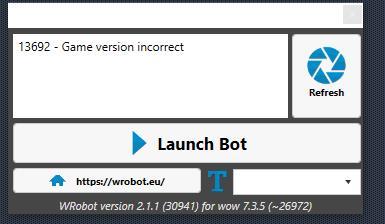
gv.jpg

User Feedback

Recommended Comments

Feargewinnt

WRobot user

hi, sure i can.

but i cant get a log from inside the bot, cause the bot tells me game version incorrect. 

maybe u can use the generatet file but there r no errors.


iam using the right version of legion and pandaria, but when i try to start the bot tells me incorrect gameversion


18 Aug 2018 14H55 - ODsycew.log.html

18 Aug 2018 14H55.log.html

Feargewinnt

WRobot user

Hi,

here r 2 screenshots


regards

bot1.jpg

bot2.jpg

Feargewinnt

WRobot user

Hi,

i know and i´ve testet out with my other Clients, but still the same.

I try a complete reinstall of Pandaraia & Lgeion.

regards

Feargewinnt

WRobot user

Hi,


sorry it was my failure.

i´ve signet the foldernames wrong. i did a misstake with 32 & 64 bit. now when i choose the right one, all works great.

sorry

Create an account or sign in to comment

Account

Navigation

Search

Search

Configure browser push notifications

Chrome (Android)
  1. Tap the lock icon next to the address bar.
  2. Tap Permissions → Notifications.
  3. Adjust your preference.
Chrome (Desktop)
  1. Click the padlock icon in the address bar.
  2. Select Site settings.
  3. Find Notifications and adjust your preference.