



Skip to content
View in the app

A better way to browse. Learn more.

WRobot

A full-screen app on your home screen with push notifications, badges and more.

To install this app on iOS and iPadOS
  1. Tap the Share icon in Safari
  2. Scroll the menu and tap Add to Home Screen.
  3. Tap Add in the top-right corner.
To install this app on Android
  1. Tap the 3-dot menu (⋮) in the top-right corner of the browser.
  2. Tap Add to Home screen or Install app.
  3. Confirm by tapping Install.

Make CustomClass Thread public

  • Version: All
  • Product: WRobot General
  • Type: Suggestion
  • Status: Added

Hey @Droidz,

I am working on my own product atm and need to pause the fightclass during regeneration, so that it doesn't interrupt eating/drinking.
I don't want to unload/reload custom class all the time. It's ineffective and for some developers probably would even create memory leakes because they do not dispose correctly.
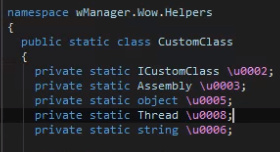
image.png.4e44714727ac51bfc3da9b6499a3a27c.png

I'd like to access this thread so I can sleep it manually.
For now, I think I will have to use reflection.

User Feedback

Recommended Comments

Matenia

Elite user

Also if you know a better way to pause fightclass thread than this, let me know:

private Thread SleepFightClassThread(List<Thread> threadsToSleep)
		{
			Thread fightClassSleepThread = new Thread(() =>
			{
				try
				{
					foreach (var thread in threadsToSleep)
					{
						thread.Suspend();
					}

					while (Conditions.InGameAndConnectedAndAliveAndProductStarted && !Common.IsAttackedByNpc)
					{
						Thread.Sleep(500);
					}
				}
				finally
				{
					foreach (var thread in threadsToSleep)
					{
						thread.Resume();
					}
				}
			});
			fightClassSleepThread.Start();
			return fightClassSleepThread;
		}


Create an account or sign in to comment

Account

Navigation

Search

Search

Configure browser push notifications

Chrome (Android)
  1. Tap the lock icon next to the address bar.
  2. Tap Permissions → Notifications.
  3. Adjust your preference.
Chrome (Desktop)
  1. Click the padlock icon in the address bar.
  2. Select Site settings.
  3. Find Notifications and adjust your preference.