




Skip to content
View in the app

A better way to browse. Learn more.

WRobot

A full-screen app on your home screen with push notifications, badges and more.

To install this app on iOS and iPadOS
  1. Tap the Share icon in Safari
  2. Scroll the menu and tap Add to Home Screen.
  3. Tap Add in the top-right corner.
To install this app on Android
  1. Tap the 3-dot menu (⋮) in the top-right corner of the browser.
  2. Tap Add to Home screen or Install app.
  3. Confirm by tapping Install.

Quester - Gatherer (Quest Type) - Interaction Interrupted

  • Version: All
  • Product: Quester
  • Type: Bug
  • Status: Awaiting Feedback

When using a Gatherer quest type on a 1.12.1 server, object interaction is being interrupted when "Farm successful" is output in the log and the character is moving on to the next object before gathering is complete. This is happening indefinitely and almost zero Gatherer quest types are able to be completed because of it. In this example, only 1 Webwood Egg is needed to be gathered to complete the Pulse step:

21:17:05 - [Farming] Farm Webwood Eggs > 10933.3 ; 922.297 ; 1340.05 ; "None"
21:17:11 - [Farming] Farm successful
21:17:13 - [Farming] Farm Webwood Eggs > 10931.6 ; 926.534 ; 1340.53 ; "None"
21:17:14 - [Farming] Farm successful
21:17:16 - [Farming] Farm Webwood Eggs > 10933.3 ; 929.184 ; 1340.81 ; "None"
21:17:17 - [Farming] Farm successful
21:17:17 - [Farming] Farm Webwood Eggs > 10929.4 ; 923.083 ; 1339.99 ; "None"
21:17:19 - [Farming] Farm successful
21:17:20 - [Farming] Farm Webwood Eggs > 10932.1 ; 917.925 ; 1339.32 ; "None"
21:17:21 - [Farming] Farm successful
21:17:21 - [Farming] Farm Webwood Eggs > 10932.4 ; 911.63 ; 1337.94 ; "None"
21:17:24 - [Farming] Farm successful

Thoughts?


Attached Files:
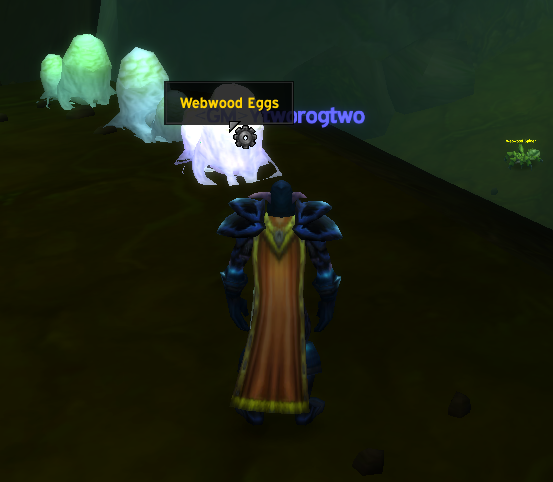
User Feedback

Recommended Comments

Hello, try to use quest type 'usescripton', you can select select interact distance

y2krazy

Members

What does interact distance have to do with this issue? It never has an issue getting within interact range of the object, it just interrupts the cast for gathering the item and never completes the cast.

Select quest type "UseScriptOn", activate option "Is C# (if unchecked, it is LUA script)" and in script textbox put code like:

Thread.Sleep(Usefuls.Latency + 5000);

(replace 5000 by wait time)

You can also try to increment your min/max latency only for this quest (add 1000 ms)

y2krazy

Members

Unfortunately no good news, @BetterSister. Despite swapping to UseScriptOn and adding the script provided by @Droidz above, the character is running to the objects, presumably running the script (and waiting 5000 ms), then moving to the next object. It does not even attempt to interact with the quest objects. Tested on multiple quests in multiple zones on multiple characters, all with the same result.

Schaka suggested on Discord to clear my session blacklist to see if that helped, but that did not. I'm honestly at a loss as to why this is happening.

y2krazy

Members

Thoughts on why this could be @Droidz?

y2krazy

Members

:unsure:

akke

Members

Hey, did you ever figure out how to fix this?

akke

Members

Hello again, i seem to have fixed the issue for me. I had an addon called oCB3 which is an addon that customizes the castbar. I believe that is what's causing this problem. Cheers and hope it helps!

Create an account or sign in to comment

Account

Navigation

Search

Search

Configure browser push notifications

Chrome (Android)
  1. Tap the lock icon next to the address bar.
  2. Tap Permissions → Notifications.
  3. Adjust your preference.
Chrome (Desktop)
  1. Click the padlock icon in the address bar.
  2. Select Site settings.
  3. Find Notifications and adjust your preference.