



Skip to content
View in the app

A better way to browse. Learn more.

WRobot

A full-screen app on your home screen with push notifications, badges and more.

To install this app on iOS and iPadOS
  1. Tap the Share icon in Safari
  2. Scroll the menu and tap Add to Home Screen.
  3. Tap Add in the top-right corner.
To install this app on Android
  1. Tap the 3-dot menu (⋮) in the top-right corner of the browser.
  2. Tap Add to Home screen or Install app.
  3. Confirm by tapping Install.

totown Mammoth bug

  • Product: WRobot General
  • Type: Bug
  • Status: Unconfirmed

Often gets stuck when trying to sell to a mammoth, if the bot is too high above the ground and the totown state is called, while the bot goes down, it adds a vendor on a mammoth to the blacklist and then gets into a cycle of endless attempts to sell trash to NPC on a mammoth, which is blacklisted at 120 minutes. Please fix it, cause of this bug, bots that do not have a mammoth farm more gold than those who have it.
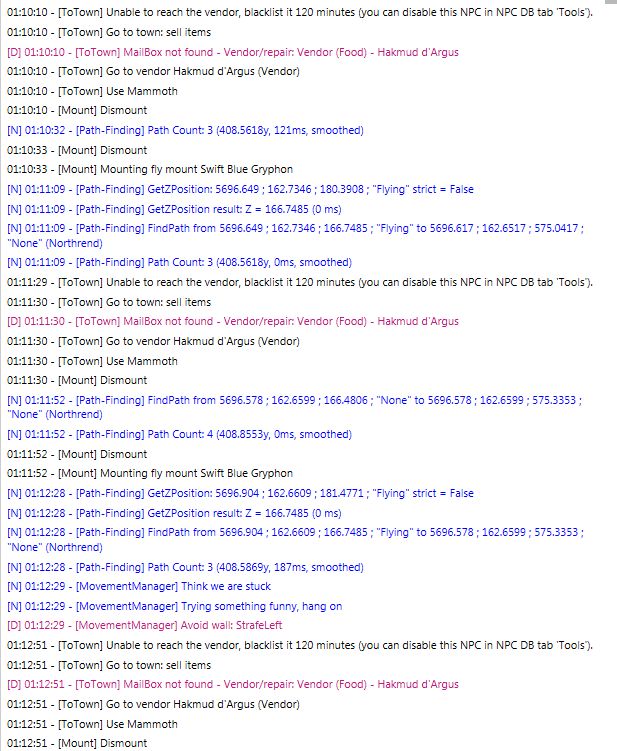


image.thumb.png.312db3c512bb8cfe492f21df04f21f7d.png


User Feedback

Recommended Comments

Pudge

WRobot user


This bug appears when the bot changes one profile, in which it does'nt need to sell anything and the sale and repair settings are turned off for another, grinding one, where the bot often uses the seller. And if he is too high by vector Z, when changing quest profiles == this bug appears.

Hi,
I just tried, even though I'm at the highest the bot descends to the ground. Are you in a blacklisted area when you have this problem?

Pudge

WRobot user
14 hours ago, Droidz said:

Are you in a blacklisted area when you have this problem?


it seems not, I will tell you exactly when the problem will recur and then I'll write

Pudge

WRobot user


no, definitely the bot is not inside the blacklist circle when it bugs.

@DroidzI sent you a log in pm.


Create an account or sign in to comment

Account

Navigation

Search

Search

Configure browser push notifications

Chrome (Android)
  1. Tap the lock icon next to the address bar.
  2. Tap Permissions → Notifications.
  3. Adjust your preference.
Chrome (Desktop)
  1. Click the padlock icon in the address bar.
  2. Select Site settings.
  3. Find Notifications and adjust your preference.