Skip to content
View in the app

A better way to browse. Learn more.

WRobot

A full-screen app on your home screen with push notifications, badges and more.

To install this app on iOS and iPadOS
  1. Tap the Share icon in Safari
  2. Scroll the menu and tap Add to Home Screen.
  3. Tap Add in the top-right corner.
To install this app on Android
  1. Tap the 3-dot menu (⋮) in the top-right corner of the browser.
  2. Tap Add to Home screen or Install app.
  3. Confirm by tapping Install.

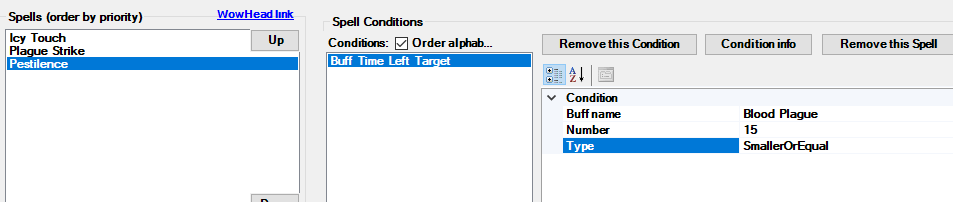
[WOTLK] "Buff Time Left Target" dosn't work

  • Version: All
  • Product: Fight Classes
  • Type: Bug
  • Status: Not a Bug

image.png.a99d422bd20ef84d7872e36e7574156d.png

Don't use Pestilence at all

User Feedback

Recommended Comments

TheSmokie

Banned

Personally i dislike fightclass editor, if you want tomorrow when i help you, i can teach you to use VS instead of fightlclasses editor.

Hello, time in WRobot is mainly in milliseconds (I think you use seconds in you screenshot)

TheSmokie

Banned
2 hours ago, Droidz said:

Hello, time in WRobot is mainly in milliseconds (I think you use seconds in you screenshot)

This sounds like a fix to the problem.

Icvrewq

Members

After A LOT of testing i got this numbers :

bigger than 130000 = will cast it non stop whenever possible

smaller than 100000 = will never cast it

At 120000 it will actually cast it at 12 seconds and at 110000 it will cast it at 2 seconds left of buff.

109000 = 1sec

115000=7sec

Maybe i miss something but this is what i got ..

In tab "Tools" > "Dev... tools" when you click on  button "Target (de)buff items" result is incorrect?

Icvrewq

Members

definitly not the right result

image.png.402cab6fe2aee43ddcd6dd70e9caad6b.png

I test and result are good on Wotlk, you have try to use another wow client?

Icvrewq

Members

When i test it on Sunwell it works just fine with ms but on Warmane i get this numbers

Icvrewq

Members

Orc Deathknight

Create an account or sign in to comment

Account

Navigation

Search

Search

Configure browser push notifications

Chrome (Android)
  1. Tap the lock icon next to the address bar.
  2. Tap Permissions → Notifications.
  3. Adjust your preference.
Chrome (Desktop)
  1. Click the padlock icon in the address bar.
  2. Select Site settings.
  3. Find Notifications and adjust your preference.