




Skip to content
View in the app

A better way to browse. Learn more.

WRobot

A full-screen app on your home screen with push notifications, badges and more.

To install this app on iOS and iPadOS
  1. Tap the Share icon in Safari
  2. Scroll the menu and tap Add to Home Screen.
  3. Tap Add in the top-right corner.
To install this app on Android
  1. Tap the 3-dot menu (⋮) in the top-right corner of the browser.
  2. Tap Add to Home screen or Install app.
  3. Confirm by tapping Install.

[Vanilla] Dwarf/Gnome grinder levels 1-10 1.0.0

(0 reviews)

1 Screenshot

This profile is for dwarves and gnomes starting zone and is separated into two sections (because of vendor/repair and class trainer locations).

The first section is for levels 1-6 in Coldridge valley. It includes the imp quest for gnome warlocks. If you are NOT a warlock, you need to disable the steps to pickup, pulse and turnin for the quest Beginnings. Like so:
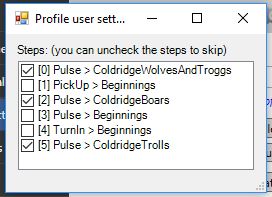
coldridgeorder.JPG.cb72159d11d8aea2be43b92acebabb1e.JPG

The second section is for levels 6-10. Trainers and repair are in Kharanos.

You NEED TO RUN THESE AS QUESTER.

P.S. If you are a gnome warlock, your voidwalker quest is in the Slaughtered Lamb in Stormwind (Mage Quarter). So you might as well go there and continue as you would a human after that.

P.P.S. Gnome master race

User Feedback

You may only provide a review once you have downloaded the file.

There are no reviews to display.

Account

Navigation

Search

Search

Configure browser push notifications

Chrome (Android)
  1. Tap the lock icon next to the address bar.
  2. Tap Permissions → Notifications.
  3. Adjust your preference.
Chrome (Desktop)
  1. Click the padlock icon in the address bar.
  2. Select Site settings.
  3. Find Notifications and adjust your preference.