





Skip to content
View in the app

A better way to browse. Learn more.

WRobot

A full-screen app on your home screen with push notifications, badges and more.

To install this app on iOS and iPadOS
  1. Tap the Share icon in Safari
  2. Scroll the menu and tap Add to Home Screen.
  3. Tap Add in the top-right corner.
To install this app on Android
  1. Tap the 3-dot menu (⋮) in the top-right corner of the browser.
  2. Tap Add to Home screen or Install app.
  3. Confirm by tapping Install.

Rogue Assassination - Poison BUILD 7.3.5 26365

(0 reviews)

2 Screenshots

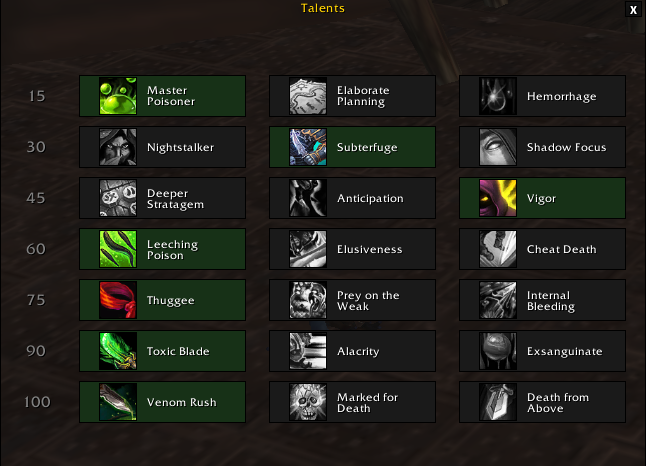
Use talents (1,2,3,1,1,1,1) Check screenshot.

Great profile for PVE, in the future I will post with improvements for PVP.

CHECK THE OPTIONS ON FIGHTCLASS, see screenshot  2 !!!

  • Auto Stealth
  • Auto Interrupt (KICK for spells can interrupt and Kidney Shot for all Spells) RECOMMEND DISABLE *Kidney Shot* in PVE, to save combo points.
  • Auto apply Deadly Poison and Leech Poison
  • In your build stats use: Mastery > Critical > Haste                  ( focus in Mastery )


Tell me what you think, did you find any fault? Say it !
I accept rotations and suggestions for improvements.

What's New in Version 26365

Released

  • Improved rotation for more dps and defensive skills.

User Feedback

You may only provide a review once you have downloaded the file.

There are no reviews to display.

Account

Navigation

Search

Search

Configure browser push notifications

Chrome (Android)
  1. Tap the lock icon next to the address bar.
  2. Tap Permissions → Notifications.
  3. Adjust your preference.
Chrome (Desktop)
  1. Click the padlock icon in the address bar.
  2. Select Site settings.
  3. Find Notifications and adjust your preference.