




Skip to content
View in the app

A better way to browse. Learn more.

WRobot

A full-screen app on your home screen with push notifications, badges and more.

To install this app on iOS and iPadOS
  1. Tap the Share icon in Safari
  2. Scroll the menu and tap Add to Home Screen.
  3. Tap Add in the top-right corner.
To install this app on Android
  1. Tap the 3-dot menu (⋮) in the top-right corner of the browser.
  2. Tap Add to Home screen or Install app.
  3. Confirm by tapping Install.

[FREE] Automatically Combine Motes 1.0.1

(1 review)

2 Screenshots

Automatically combines the following motes whenever you collect 10 of them.

Mote of Shadow, Mote of Air, Mote of Fire, Mote of Earth, Mote of Water, Mote of Life, Mote of Harmony, Mote of Mana

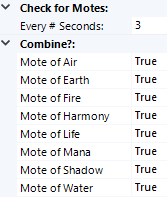
Plugin has settings to customize usage. (See Screenshot)


How to use : 
Add the Combine Motes.cs file to the Wrobot Plugins folder.
After this, start up bot, go to the tab called "Plugins" and turn "Combine Motes.cs" by on.


What's New in Version 1.0.1

Released

Added Settings to the plugin so that you can toggle which motes you want combined, and how often you want to check for motes that need combined.


User Feedback

You may only provide a review once you have downloaded the file.


Great Job ! 

Account

Navigation

Search

Search

Configure browser push notifications

Chrome (Android)
  1. Tap the lock icon next to the address bar.
  2. Tap Permissions → Notifications.
  3. Adjust your preference.
Chrome (Desktop)
  1. Click the padlock icon in the address bar.
  2. Select Site settings.
  3. Find Notifications and adjust your preference.