
Apexx
Elite user
-
Joined
-
-
-
Try this -- In the fight class editor, there is a box under the Name of the fight class with pet options as well. Look for "Custom Code" or "Additional C# Code".. I cannot remember off the top of my head right now.. Enter: internal static bool CanBleed(WoWUnit unit) { return unit.CreatureTypeTarget != "Elemental" && unit.CreatureTypeTarget != "Mechanical"; } Then in the selected spell conditions add C# check and type: CanBleed(ObjectManager.Target)
-
I made a healing class and altered it to be a "Plugin" rather than a Fight Class it worked well without having a target or being "in combat".
-
-
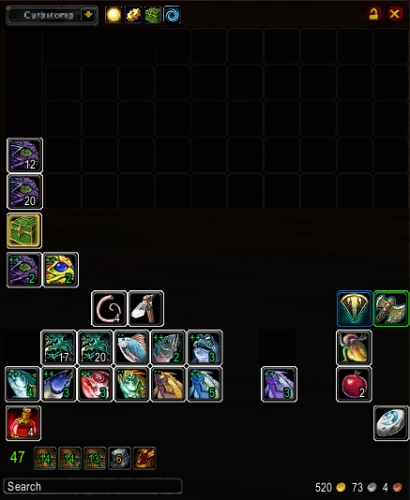 TBag is a WoW Addon that provides an alternative bag and bank interface. I modified accessing the menu from the standard Right-Click interaction, to Shift + Right-Click. It got on my nerves when I clicked just outside the bag slot(s), and the menu would pop-up while vendoring quickly. TBag_Modded.rar
 -
-
-
Looking back at this thread today and here is a rough method that I came up with: public float TargetTimeToDie; private double damagePerSecond; private double targetPreviousHealth; private Timer timerDPS = new robotManager.Helpful.Timer(1000); private void FightEvents_OnFightLoop(WoWUnit unit, System.ComponentModel.CancelEventArgs cancelable) { if (timerDPS.IsReady) { if (ObjectManager.Target.Health < targetPreviousHealth) { //How much damage was done since the last second //Helpers.LogDebug($"targetCurrentHealth({ObjectManager.Target.Health}) - previousHealth({previousHealth})"); damagePerSecond = System.Math.Abs(targetPreviousHealth - ObjectManager.Target.Health); TargetTimeToDie = (float)System.Math.Round(ObjectManager.Target.Health/ damagePerSecond, 1); Helpers.LogDebug($"Target will die in ~{TargetTimeToDie} second(s)."); } targetPreviousHealth = ObjectManager.Target.Health; } } Usage (Maybe you do not want to use large cooldowns on the target if they will die in such time. Or do not place totems, etc..): if (TargetTimeToDie < 10.0f) return;
-
And may I ask what game version you are working with?
-
-
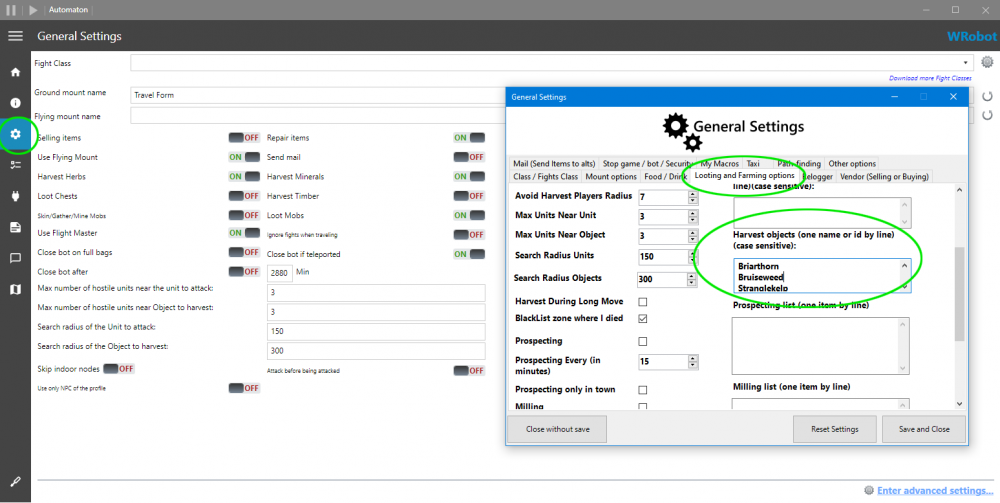
Hello, Click, "Enter Advanced Settings" (Bottom right) of the General Settings for WRobot. Open the "Looting and Farming Options" tab. On the right-hand side, there is a list called, "Harvest objects". Here you enter each object you would like to farm (one object per line).
-
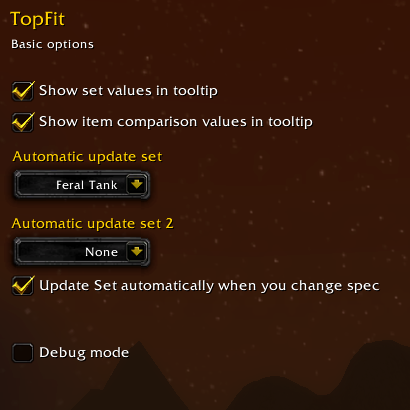 Hit, "C" key to bring up your character panel. In the panel you should see a drop-down box above your character's head. Select your desired build. Close the character panel. Hit "Escape" key and bring up your Interface panel. Select the "AddOns" tab at the top. Click "TopFit" from the left panel list of addons. Check both, "Show set values in tooltip" and "Show item comparison values in tooltip". Then in the "Automatic update set" drop-down box, select your desired build. Close the Interface panel. I suggest re-logging to save your steps. I hope this was helpful enough.
 -
-
The TopFit addon for Cata 4.3 that I modified to allow auto-equipping better Bind on Equip items. Instructions: Hit, "C" key to bring up your character panel. In the panel you should see a drop-down box above your character's head. Select your desired build. Close the character panel. Hit "Escape" key and bring up your Interface panel. Select the "AddOns" tab at the top. Click "TopFit" from the left panel list of addons. Check both, "Show set values in tooltip" and "Show item comparison values in tooltip". Then in the "Automatic update set" drop-down box, select your desired build. Close the Interface panel. I suggest re-logging to save your addon data.
-
You could try: RunMacroText('/cast [form: 1] Mangle(Bear Form)') try { if (ObjectManager.Me.HaveBuff(bearForm.Ids) && timerMangle.IsReady && ObjectManager.Target.GetDistance <= 5) { if (SpellManager.GetSpellCooldownTimeLeft(mangle.Id) <= 0) { await Helpers.RunMacro("/cast [form: 1] Mangle(Bear Form)", timerMangle.IsReady); timerMangle = new Timer(SpellManager.GlobalCooldownTimeLeft() + 255 + Usefuls.Latency); } } } catch (Exception ex) { Helpers.LogWrite($"Mangle() Exception error. {ex.Message}.", true); }
-
-
 I wanted to give this plugin some love! I like to fish in WoW probably as much as you do, so this product is a must-have for any other fisherman out there! I went to add in the "Curious Crate" object to the "Auto open container" list, and it was already in there. Very thorough and I enjoy it very much, so Thank you!
 -
-
 Sye24 reacted to a post in a topic:
Captcha on wowcircle (private server 3.3.5a) / Капча на wowcircle
Sye24 reacted to a post in a topic:
Captcha on wowcircle (private server 3.3.5a) / Капча на wowcircle
-
It seems to me, it sounds like it is time to find a new server to enjoy WRobot on. That is obnoxiously intrusive on gameplay even if I was not botting, that would get annoying real quick!
-
 Apexx reacted to a comment on a file:
[Free] Project Wholesome - WOTLK Fightclasses (all 10 included)
Apexx reacted to a comment on a file:
[Free] Project Wholesome - WOTLK Fightclasses (all 10 included)
-
Apexx reacted to a comment on a file:
[Free] Project Wholesome - WOTLK Fightclasses (all 10 included)
-
Hi, In General Settings -> Enter Advanced Settings -> Class/Fight Class tab -> is "Start fighting with Elite" checked?
-
-
-
-
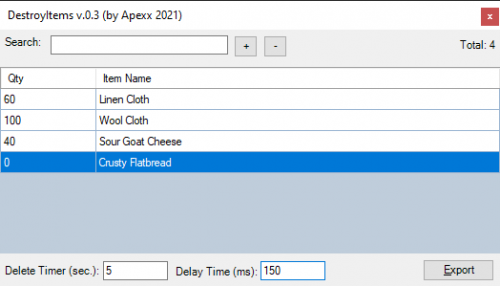 A simple plugin to destroy items from your bags using a collection that you specify as well as a quantity of that item to keep. C O N T R O L S + => Add a new item row. - => Remove selected row(s). Delete Timer (sec) => The count-down timer will start and reset while not in combat. Once the timer reaches 0, it will scan you bags for items. Delay Time (MS) => Adjusting this value will wait the desired (millisecond) delay between each deletion. Adjust higher if you are ejected from the server. Export => Save your collection to the \Plugins\ directory. Donate (If you like the product, please consider a small donation.)