



Skip to content
View in the app

A better way to browse. Learn more.

WRobot

A full-screen app on your home screen with push notifications, badges and more.

To install this app on iOS and iPadOS
  1. Tap the Share icon in Safari
  2. Scroll the menu and tap Add to Home Screen.
  3. Tap Add in the top-right corner.
To install this app on Android
  1. Tap the 3-dot menu (⋮) in the top-right corner of the browser.
  2. Tap Add to Home screen or Install app.
  3. Confirm by tapping Install.

[PAID]fix turtle spell name. 4.0.0

(0 reviews)

1 Screenshot

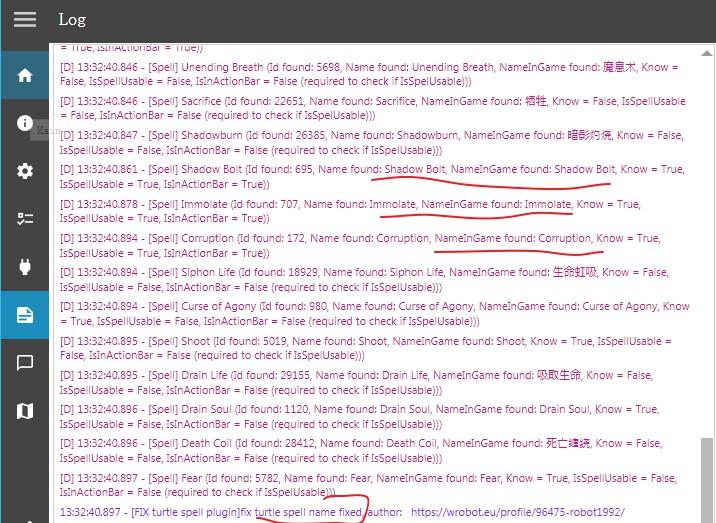
Correcting the issue of inability to properly cast spells in Turtle WoW,

fixing spell names in Turtle WoW

processing the names of learned skills. Ensuring spells can be cast correctly.


version 2.0 has updated, now it can fix all spells.

version 3.0 has updated

version 4.0 has uploaded (paid version) 2026/3/5


Try it for free for one day: https://www.115202.xyz/#/?prod=prod_1772634470812

The key to bind the WRobot, with the key filled in with the WRobot Key first 10 digits.


fix topic: 


What's New in Version 4.0.0

Released

paid version

User Feedback

You may only provide a review once you have downloaded the file.

There are no reviews to display.

Account

Navigation

Search

Search

Configure browser push notifications

Chrome (Android)
  1. Tap the lock icon next to the address bar.
  2. Tap Permissions → Notifications.
  3. Adjust your preference.
Chrome (Desktop)
  1. Click the padlock icon in the address bar.
  2. Select Site settings.
  3. Find Notifications and adjust your preference.
