




Skip to content
View in the app

A better way to browse. Learn more.

WRobot

A full-screen app on your home screen with push notifications, badges and more.
To install this app on iOS and iPadOS
  1. Tap the Share icon in Safari
  2. Scroll the menu and tap Add to Home Screen.
  3. Tap Add in the top-right corner.
To install this app on Android
  1. Tap the 3-dot menu (⋮) in the top-right corner of the browser.
  2. Tap Add to Home screen or Install app.
  3. Confirm by tapping Install.

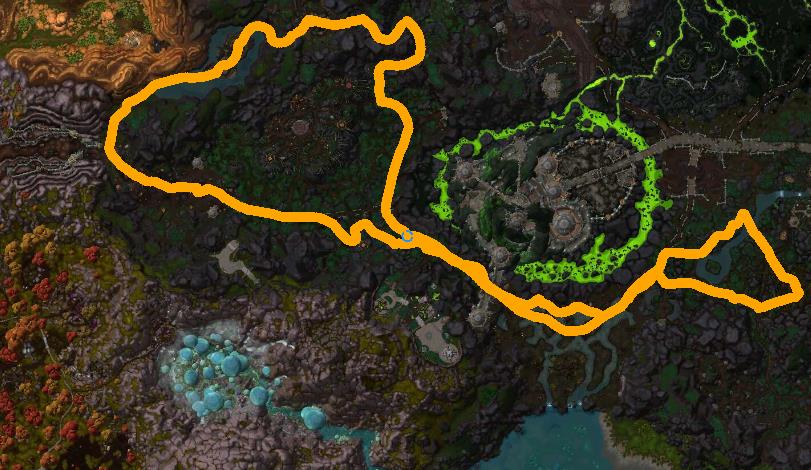
Tanaan Jungle (lvl 100) (Ground)(Mine, Herb, Timber) 2

(0 reviews)

1 Screenshot


Tanaan Jungle (lvl 100) (Ground)(Mine, Herb, Timber)


(if you want avoid to skip zone, activate option "Back to last profile position")


What's New in Version 2

Released

No changelog available for this version.

User Feedback

Recommended Comments

ejackson30

Members

i wish tanaan jungle wasn't so fucked up. i hate babysitting my bot.

da8ball

Elite user

Droidz,


This path does not work. It pats through that green slime and makes the character stick.


You can simply blacklist the area.

Virux070

Members

is there a way to make it for bot to not gather if its near npc so they dont attack 

is there a way to make it for bot to not gather if its near npc so they dont attack 


Hello,


In "General settings" you can use option "Max unit near...", if you use druid, you can activate option "ignore combat if druid form..."

hansungkim

Members

The Horde
The Alliance continues to move into the village.
How do I fix it?

shemaiah

Members

how can i fly instead on walking on the profile, i can fly but the bot prefer to fly very low as if im on a ground mount

Hello,

It is "ground" profile, you need to create/use flight profile.

Xothak

Members

Hello,

It is "ground" profile, you need to create/use flight profile.

Hey awesome Droidz, any chance you could make a flying profile? for tanaan

hansungkim

Members

Do not go out of town.

Account

Navigation

Search

Search

Configure browser push notifications

Chrome (Android)
  1. Tap the lock icon next to the address bar.
  2. Tap Permissions → Notifications.
  3. Adjust your preference.
Chrome (Desktop)
  1. Click the padlock icon in the address bar.
  2. Select Site settings.
  3. Find Notifications and adjust your preference.