




Skip to content
View in the app

A better way to browse. Learn more.

WRobot

A full-screen app on your home screen with push notifications, badges and more.

To install this app on iOS and iPadOS
  1. Tap the Share icon in Safari
  2. Scroll the menu and tap Add to Home Screen.
  3. Tap Add in the top-right corner.
To install this app on Android
  1. Tap the 3-dot menu (⋮) in the top-right corner of the browser.
  2. Tap Add to Home screen or Install app.
  3. Confirm by tapping Install.

[H] [Quester] Hyjal 80-83 1.0.0

(2 reviews)

1 Screenshot

Just a profile i have been working on for 80-85.  Its not 100% AFK yet so i cant really say its my best work (see below)

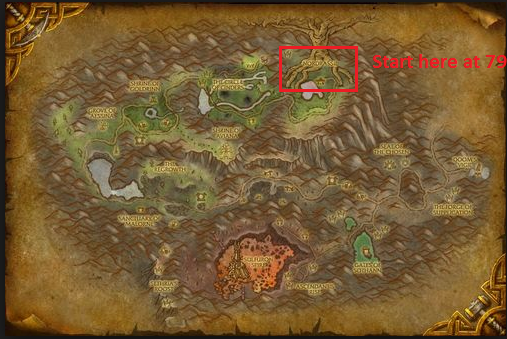
You can start this at 79 at Nordrassil in Hyjal its got a filler so it will kill elementals till 80, at which point it starts questing.  i think it will get to 81.5-82 from quests on my bots with heirlooms.. then there is a grind filler after the quests, if you leave it long enough you can get 85.


if someone can try with alliance and let me know if it works that would be cool.

Known issues:

Only part which makes this non afk is the pathing on quest "barron geddon" which should be about 15 minutes in.  The bot will die here if left AFK and the pathing from the GY back you your corpse is bad so the bot will get stuck.  once you have completed that quest its all AFK though.

User Feedback

You may only provide a review once you have downloaded the file.


good profile but a little dangerous, it farms too close to the starting zone of hyjal. there will be many players around due to quest and it pull large groups of mobs. nonetheless it gets the job done. i got 3 toons from 80 to 85 using this profile until i kept dying when using this for a clother toon. so i searched for other profiles and i found the alternative below. regardless, thanks alot for sharing and it's a decent profile. :)

this is a safer profile by droidz: 


   3 of 3 members found this review helpful 3 / 3 members

Thank you for the profile!  Got stuck once at barron geddon like you mentioned, but it was smooth sailing after that.  got me from 80 to nearly 83.

Account

Navigation

Search

Search

Configure browser push notifications

Chrome (Android)
  1. Tap the lock icon next to the address bar.
  2. Tap Permissions → Notifications.
  3. Adjust your preference.
Chrome (Desktop)
  1. Click the padlock icon in the address bar.
  2. Select Site settings.
  3. Find Notifications and adjust your preference.