



Skip to content
View in the app

A better way to browse. Learn more.

WRobot

A full-screen app on your home screen with push notifications, badges and more.

To install this app on iOS and iPadOS
  1. Tap the Share icon in Safari
  2. Scroll the menu and tap Add to Home Screen.
  3. Tap Add in the top-right corner.
To install this app on Android
  1. Tap the 3-dot menu (⋮) in the top-right corner of the browser.
  2. Tap Add to Home screen or Install app.
  3. Confirm by tapping Install.

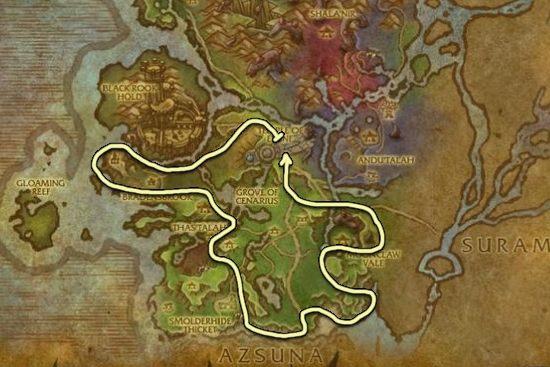
Val'shara - Mine & Herb route 1.0.0

(1 review)

1 Screenshot

Hiya
,

I've just made this profile, I've tested in and haven't run into any problems.

By the way I love this program to make profiles. Kids can do the laundry. And it even goes to nodes/herbs I haven't actually walked to while making the profile, because I thought it would be too difficult to get to.

I don't have any /hr data or anything, you're welcome to test it yourself. If you find it gets stuck somewhere, please tell so I can change it.


~Share and create guys.


version 1.0.0 requires you to be 110 and it runs into some areas it shouldn't I'm going to update this later to prevent it from going into those areas.

User Feedback

Recommended Comments

TheThirdEye

Members

Testing Now :) 

PtoAmo

Members

Im testing it, and i can say that is so good except because the profile doesnt mine the basilisk that pops when u mine a ore.

da8ball

Elite user

1 hour ago, PtoAmo said:

Im testing it, and i can say that is so good except because the profile doesnt mine the basilisk that pops when u mine a ore.

That's your settings, not the profile.


I am dying A LOT around 63.80, 63.30. It goes in the river, a lot of mobs are following, and since the water slows the bot down, it is mounted (thus ignoring the mobs), it dies. Also gets stuck badly to get out the water.

Getting stuck also @ 65.65, 73.17 under a rock.

@ 34.44, 56.21 on the middle of the hill

Other few areas I also got stuck, but the jumping function saved me.


My safety settings shut the bot after 25 blockages, and that happened twice in less tha an hour. 


Gotta improve that so it's reliable, thanks for sharing!

Account

Navigation

Search

Search

Configure browser push notifications

Chrome (Android)
  1. Tap the lock icon next to the address bar.
  2. Tap Permissions → Notifications.
  3. Adjust your preference.
Chrome (Desktop)
  1. Click the padlock icon in the address bar.
  2. Select Site settings.
  3. Find Notifications and adjust your preference.