Droidz
Administrators
-
Joined
-
Last visited
Everything posted by Droidz
-
Pouvez vous partager le (après avoir lancé votre profil)
-
ps: Pour poster un log (ou profil) à votre poste lisez ce tuto:
-
Je viens d'essayer le début de votre profil fonctionne très bien, il va bien prendre la quête (avec un humain Démoniste). Voila un exemple avec la quête complète: (01-05)Humain Pierre modifié.xml
-
Hello, Reply here:
-
Hello, Update WRobot, problem is resolved (if problem is not resolved please send me your log again with debug log activated). Thank you for report.
-
Hello, Sorry for delay I have reply http://wrobot.eu/page/bug_tracker.html/_/pet-battles-bot-wont-run-any-pet-battle-profiles-r270yesterday.
-
Bonjour, Votre configuration semble correcte, pouvez-vous partager votre profil que je regarde ce qui coince.
-
Hello, Hello, Can you share of bugged session please
-
Hello, Thank you for report and sorry for the troubles, this problem has caused by the changes on last update. Please update again WRobot, the problem is resolved.
-
Close all WRobot process (restart your computer). If this don't resolve your problem try to disable your antivirus
-
Salut, Je viens de tester de nouveau le code que j'ai écrit il fonctionne (il ne passe pas dans le while dans ton code car tu as enlevé le "Thread.Sleep(700);") Pour arréter le lancement d'un sort tu peux essayer: Lua.LuaDoString("SpellStopCasting()"); ou Move.Backward(); Move.Forward();
-
Do you get this problem on all continents or only in Draenor?
-
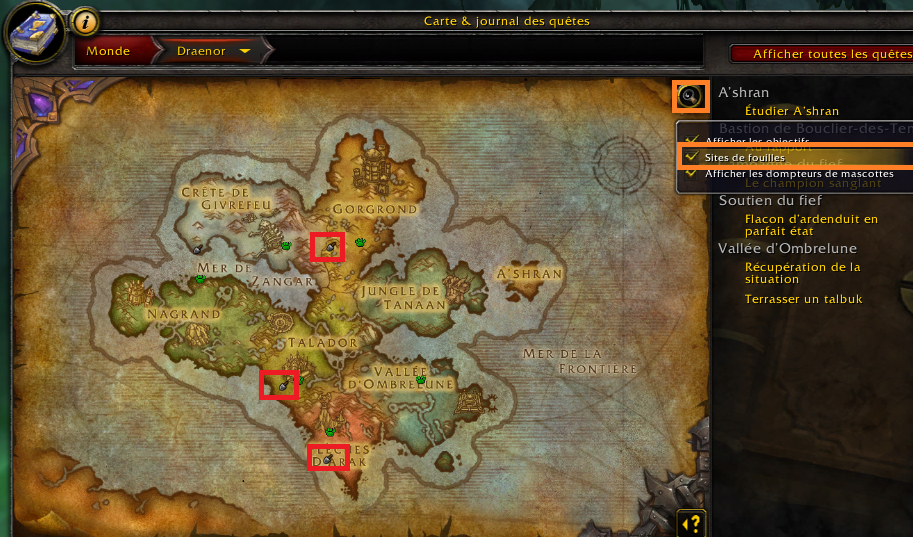
Hello, In your Wow map (key "M"), do you can view dig sites icon (if no, activate dig site option (top/right))?
-
Hello, You can ignore this message if this don't cause problems. A lot of softwares use Wow process like WRobot (like http://raptr.com/, http://www.teamspeak.com/, http://www.mumble.com/, ... generaly this softwares draw in wow window).
-
Hello, You can activate/deactivate manually dig sites by name (in tab "Product Settings" ), but no automatic way to bot only one dig sites type.
-
Hello, Glad to hear that your problem is solved. I don't think that this problem has been caused by graphics settings change, but it is possible than one mesh file has been corrompus (download fail?).
-
Hello, This dll is in folder "WRobot\Bin\" (robotManager.dll, wManager.dll, MemoryRobot.dll (add this files in project references)).
-
Hello, Check if you haven't modified default settings of world map in game (if you don't use addon and digsite landmark is activated).
-
How to go to The Temple of Atal'Hakkar: https://www.youtube.com/watch?v=vvM0s37YFgE
-
Hello, For advanced user: - You can found sample of dungeon profile http://wrobot.eu/files/file/453-dungeon-the-temple-of-atalhakkar/ file description to get more informations) and https://wrobot.eu/forums/topic/3552-dungeon-profile-creation-tutorial-video/ For beginner users: - Install and activate this plugin: http://wrobot.eu/files/file/496-reset-instances/ - In "General Settings", disable option "Close bot if teleported". - Select product "Gatherer" or "Grinder" and activate option "Back to last profile position" in "Product Settings". - Now, use "Profile Creator" and record loop path (in your loop, go out of instance) (You can download gatherer profile sample of "Hellfire Ramparts" here) (you can use "Action" to add feature at your profile)
-
-
[Dungeon] The Temple of Atal'Hakkar This profile works with "Quester" product (copy downloaded file in folder "WRobot\Profiles\Quester\" and use it with product "Quester") (try to start near dungeon portal). ps: It is a dungeon sample profile, to get more informations about how to create dungeon profile, edit this profile with "Easy profile creator" and read step 0 in "Quests order editor".
-
Bonjour, Oui ce bot fonctionne. Si vous avez un addon Wow qui modifie la map, il est possible que cela cause des problèmes au bot. J'ai besoin du fichier log pour mieux vous aider.
-
Hello, To use your license key you make this steps?: Launch "WRobot.exe" in administrator mode. Select game process and click on button "Launch Bot". In new window "License Keys Management" replace text "TRIAL" by your license key (you can click on button "+" to save your key) (you can found your license key here). If your problem is not resolved: Can you try to disable your antivirus/firewall. Reinstall Framework 4.0, Redistributable Visual C + + 2010 (X86) and SlimDX (4.0 X86) (more info ). If this don't works, please send me your
-
Hello, You use an old version of WRobot (and probably cracked when I look your log). I cannot give best support on old version. To fix problem try to reinstall Framework 4.0, Redistributable Visual C + + 2010 (X86) and SlimDX (4.0 X86), if this don't works make all steps of this guide: try to activate "Use Lua to Move" in advanced general settings). Best Regards, Droidz.